QAD 2017 Enterprise Edition
>
User Guides
>
Service/Support Management
>
Call Management
>
Generating Groups of Calls
Generating Groups of Calls
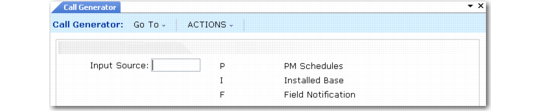
You can use Call Generator (11.1.8) to generate three types of calls:
• The next scheduled call on contract preventive maintenance schedules
• Calls for a range of items in the installed base
• Calls related to field notifications
Input Source in the initial Call Generator frame determines the kind of call generated.
Call Generator Initial Frame (11.1.8)
This section discusses generating calls for PM schedules and installed base items. The chapter on the installed base discusses generating calls for field notifications.
You can also use the Call Generator to generate PM calls for items in the installed base, apart from a PM schedule—internal maintenance schedules for your own equipment, for example. Or, you can use it to generate calls to remind end users without contracts that equipment is due for PM, thus generating extra service revenue.
Important: This utility can generate a large number of calls at one time. If run by mistake, it may take some time to eliminate the unneeded calls. You should limit who can run this program using security features. When generating calls, consider running the program in batch.