Creating Field Notifications
Many organizations track installed base information because of the possibility of product recalls. This is a concern, for example, for medical equipment manufacturers. Recalls associated with documentation and auditing requirements from regulatory agencies may require extensive audit history and control.
You can use SSM’s field notification utilities to manage the recall process.
• Use Field Notification Maintenance (11.3.12.1) to create and maintain a field notification. The field notification defines, groups and manages related calls, and maintains history. The system closes the field notification when you close its associated calls.
• Use the Call Generator (11.1.8) to generate calls associated with an existing field notification, or create a new field notification and generate calls for it.
• Use Field Notification Inquiry and Report (11.3.12.2 and 11.3.12.3) to display information associated with a field notification.
• Use Field Notification Delete/Archive (11.3.12.23) to remove a closed field notification from the system and delete obsolete history records. The field notification history includes information about the selection criteria for items, the first and last call associated with the notification, and open and close dates.
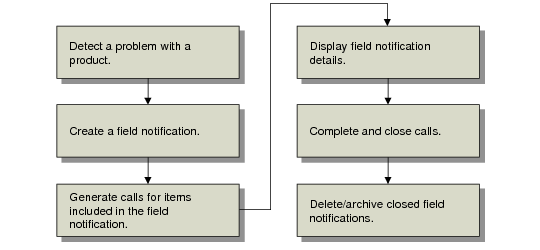
Field Notification Workflow illustrates the field notification workflow.
Field Notification Workflow
Effect of Field Notification
The system handles calls generated from a field notification in special ways:
• It adds the field notification number to the call record. When you update one of these calls, a message displays the source of the call.
• Call values for the field notification take precedence over other call defaults. The system does not use call defaults associated with the work code on the field notification, and uses an end user escalation only if one is not on the field notification. The call’s next status defaults from Call Status Maintenance. Call duration defaults from Service Management Control if you use one of its work codes.
Note: Recalls normally use either the Update of Corrective work code.
• You cannot move a closed field notification call to history unless all related calls are closed. The system automatically closes the notification when you close or cancel all calls associated with it.
Coverage for Field Notifications
The calls generated from a field notification have unique coverage needs. You do not normally charge these calls to contract or warranty coverage. For example, if you generate the field notification as a result of a product defect, you do not want to consume an end user’s contract coverage.
Field Notification Maintenance lets you override any existing coverage. When you choose this option, you can specify a service type for the calls the field notification generates. If you use existing coverage, select between contract and warranty coverage for those items in the installed base covered by both.
If you do not override coverage but do specify a default service type, the system uses it instead of the Default Call Service Type in Call Management Control for items without either warranty or contract coverage.
Choose the override service type carefully. Make the default under-limit charge code on the service type a covered charge code, rather than a contract or warranty charge code.
Field Notification Maintenance
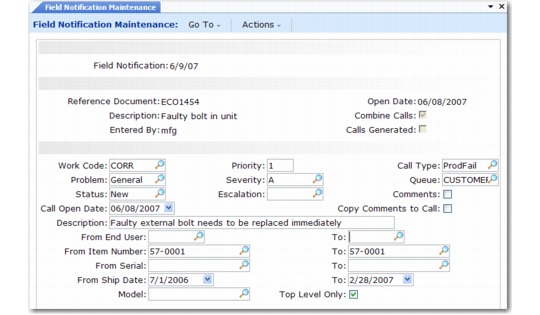
Create field notifications with Field Notification Maintenance (11.3.12.1) or with the Call Generator. Similar frames display in both.
Field Notification Maintenance (11.3.12.1)
When you create a field notification, you can associate a document—an ECO documenting the problem and product change required, or some kind of internal reference document. You can also combine an end user’s items into one call.
The remainder of the maintenance fields specify attributes of the call and selection criteria for the items in the installed base. The system generates a call or call line for each item.
Field Notification
Enter a code of up to eight characters identifying the field notification.
Reference Document
If you associate this field notification with another document, enter its identification. Twenty-four characters are allowed.
Description
Enter a brief description (maximum 24 characters) of this field notification.
Entered By
Defaults from the ID of the user logged into this session.
Open Date
Defaults from the system date, and indicates the date you opened this field notification. You can only change Open Date when you first create a notification.
Combine Calls
Specify Yes to generate one call for each end user. The system creates multiple lines for each installed base item for this end user. Specify No to create one call for each installed base item.
Calls Generated
Indicates whether you have generated calls for this field notification. The system sets it to Yes after you run Call Generator for this field notification.
Work Code
The default is blank. Enter a work code defined in Work Code Maintenance to be associated with calls generated for this field notification’s calls. Other call defaults created in Call Default Maintenance are not used. The system derives call values from the field notification.
Problem, Status, Description, Priority, Severity, Escalation, Call Type, Queue, Description
The system applies these values to the calls you generate for this field notification. The values take precedence over any other defaults. For example, the system applies an end-user escalation only if the field notification does not have one.
Call Open Date
Defaults from the system date. A call open date gives you more control over when the system processes the calls.
Comments
Defaults to Yes if comments exist; otherwise defaults to No. If Yes, the standard transaction comments frame displays when you click Next, so that you can enter or review comments related to this field notification. You can copy comments into each of the calls generated by this notification.
Copy Comments to Call
Defaults to No. Indicates if the system copies comments associated with this field notification into each call generated. Use Copy Comments to Call to print special instructions or notes on the call or call invoice.
From End User/To
Leave blank or specify a range end users for selecting installed base items.
From Item Number/To
Leave blank or specify a range of installed base items.
From Serial/To
Leave blank or specify a range of serial numbers for selecting installed base items.
From Ship Date/To
Leave blank or specify a range of ship dates for selecting installed base items.
Model
If you are tracking installed base items by model number, enter a model number in this field to include only items with this model in the calls generated.
Top Level Only
Set to Yes to create call lines only for parent items. Set to No to create call lines for each item in the installed base configuration.
Generating Field Notification Calls
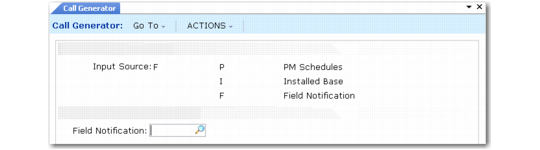
From the Call Generator (11.1.8), specify F as the input source to generate calls associated with a field notification. You are prompted to enter a notification number.
Generating Field Notification Calls
If you enter a non-existing value in the Field Notification field, you are prompted to create it. Respond Yes to create a field notification directly from the Call Generator. If the notification you enter exists, you are prompted to review it. Respond Yes to this prompt to redisplay the Field Notification Maintenance frames and update the call definition or selection criteria.
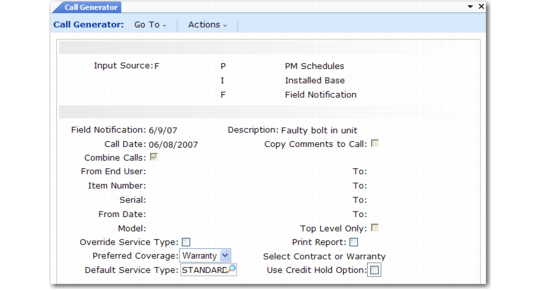
Once you specify or create the field notification, the final Call Generator frame displays. You can only update five fields.
Generating Field Notification Calls
Override Service Type
A Yes in this field indicates you want to use a different coverage than is normally attached to the item in the installed base. No directs the system to use the normal contract or warranty coverage. If No, you can choose between contract and warranty coverage for those items in the installed base that are covered by both.
If Yes, enter a valid service type in Default Service Type for coverage terms. If No, you can still enter a value for Default Service Type. The system uses the value instead of the Default Call Service Type in Call Management Control for installed base items without coverage.
Preferred Coverage (Warranty/Contract)
The system uses this field if overlapping coverage exists for an installed base item and Override Service Type is No.
Default Service Type
The effect of this field depends on Override Service Type. If Override is Yes, this field determines the terms and conditions of coverage for calls generated by this field notification. If Override is No, this field is optional and determines the terms and conditions only for call items that do not have current warranty or contract coverage.
Print Report
Indicate whether the system should generate a printed report listing the calls created. Set to Yes to run in batch. If Yes, you are prompted for an output device for the report and Batch ID. If No, a report is not generated, but a message does display when execution completes indicating the number of calls created and the range of call numbers.
Use Credit Hold Option
Use this field to override the Credit Hold Option setting in SSM Accounting Control when you generate calls for field notifications.
Yes (the default). The system checks the credit hold status and uses the SSM Accounting Control setting to determine processing for customers on credit hold:
0: Generates the call with no credit restriction
1: Displays a warning message and generates a call with the status specified in the Hold Status field in Call Management Control
2: Displays an error message and does not generate a call
No. The system disregards the control setting and creates calls without checking the credit hold status of the customer.
For example, setting the field to No lets a medical equipment manufacturer generate field notification calls related to vital equipment repairs for all customers regardless of credit status.
Deleting and Archiving Closed Field Notifications
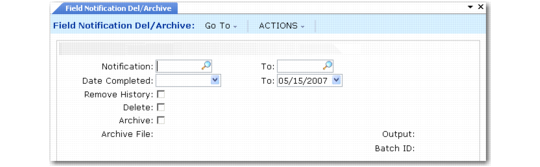
After you close or cancel the calls associated with a field notification, you can delete and archive the notification with Field Notification Delete/Archive (11.3.12.23).
Field Notification Delete/Archive (11.3.12.23)
Select records to be deleted by number or by completion date. You can include history records or retain them for potential reference.