QAD 2017 Enterprise Edition
>
User Guides
>
Service/Support Management
>
Call Quotes
>
Creating a Call from a Quote
Creating a Call from a Quote
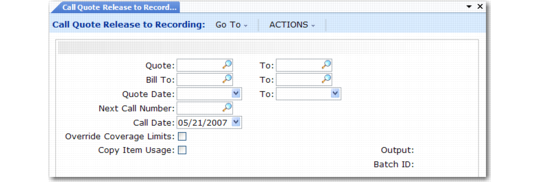
Use Call Quote Release to Recording (11.1.1.11) to create calls from selected call quotes. You can release a quote to a call only once. To be released, the quote must have the open status defined in Call Management Control.
Call Quote Release to Recording (11.1.1.11)
Call Quote Release to Recording performs the following actions:
• Sets the quote number as the Reference field in the Call Info frame of Call Maintenance and in Call Activity Recording
• Sets the call number in the Reference field of Call Quote Maintenance
• Copies the quote data to the call including the quote comments
• Copies all usage records unless Copy Item Usage is No; then only labor and expense usage is copied
• Transfers the quote’s engineer load to the call
• Creates MRP requirements
• Deletes the quote’s allocations and re-creates them for the call
• Closes each quote report, so it cannot be updated
• Sets the quote’s closed date to the release date
The first set of fields in Call Quote Release to Recording provides ways to select quotes for release. Call Date defaults from the system date, but you can modify it.
Note: Leave Next Call Number blank to supply the next number from Call Management Control.
A released quote, like an expired quote, is closed. You can move it to history, delete, and archive it.
Calculating Coverage during Release
If a contract covers items on a quote, Call Quote Release to Recording calculates coverage based on the consumption of contract limits. Set Override Coverage Limits to Yes to apply coverage even to amounts over the limits. Set it to No to use the contract limits.
If a service type (warranty or generic) provides the coverage, Call Quote Release to Recording calculates the percentage of coverage without consideration of limit amounts.
The release report informs you of limits that were overridden. You can modify coverage amounts in Call Activity Recording.
Note: When Multiple Time Zones (MTZ) is active, the quote date range and call date are relative to the customer’s time zone, since Call Quote Release to Recording uses Call Date to find default charge codes and limit coverage. Refer to
Multiple Time Zones for more information.
Errors in Releasing Quotes
Call Quote Release to Recording generates errors if either of the following occurs:
• Credit Hold Option is 2 in SSM Accounting Control and the customer or end user on the quote is on credit hold.
• The customer on the quote requires a purchase order and you have not specified one on the quote.