QAD 2017 Enterprise Edition
>
User Guides
>
Service/Support Management
>
Call Activity Recording
>
Updating the Installed Base in CAR
Updating the Installed Base in CAR
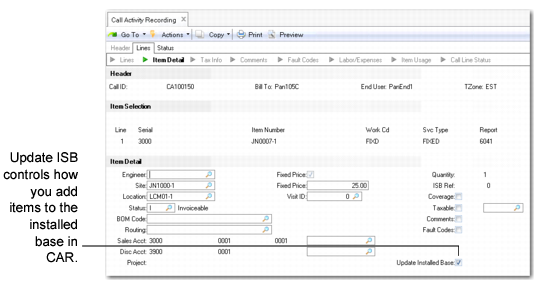
In CAR, you can update the installed base by setting Update ISB to Yes for the call line. This setting lets you:
• Add the call line item to the installed base.
• Add items you issue as components of the call line item.
• Remove items that are returned.
Update ISB Field in CAR
Update ISB defaults to Yes under the following conditions:
• The item is in the installed base. Update ISB defaults to Yes regardless of other settings.
• Installed Base in Service Item Maintenance is Yes for the item and Create ISB is Yes for the end user in End User Data Maintenance.
• The item is not in the item master, but Create ISB is Yes for the end user in End User Data Maintenance.
If you do not enter an item number, Update ISB defaults to No. If you enter the item number of a lot/serial controlled item and do not specify a lot/serial number, the system sets Update ISB to No and does not let you change it. Lot/serial-controlled items must be added to the installed base with an appropriate number.
Note: If the call item is in the installed base but the quantity specified in CAR does not match the ISB quantity, Update ISB defaults to No and cannot be changed.