Managing Invoice Detail
All billing details are available for review in Call Invoice Recording. You do not, however, have to include all the detail on the printed invoice. You can limit the amount of detail printed on the invoice using the Detail field. Define a default level of detail when you set up an invoice sort in Invoice Sort Maintenance (11.21.5). You can also specify a default for an end user in End User Data Maintenance. In CIR, you can modify the defaults to change the level of detail as needed.
Detail determines how billing information is presented on the printed invoice. When Invoice Detail is Yes, you can print billing details for each line recorded in CAR. When Invoice Detail is No for an invoice sort, the system takes the entries for related service categories, totals them into one line item, and displays one line of detail.
Invoice Detail determines how much detail can be printed on the invoice. During invoice print, you use another field to control whether or not to actually print the details.
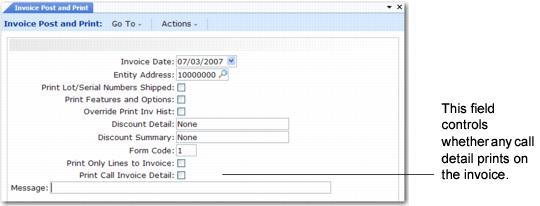
Printing Call Invoice Detail Using Invoice Post and Print illustrates the option in the second frame of Invoice Post and Print (7.13.4), which displays when Print Invoice is Yes. If you choose to post and print invoices in separate steps, a similar field is available in Invoice Print or Reprint (7.13.12).
Printing Call Invoice Detail Using Invoice Post and Print
If Print Call Invoice Detail is Yes, the system prints either the summarized line or all details you recorded, depending on the setting of Invoice Detail for the invoice sort or for the call line in CIR.
If Print Call Invoice Detail is No, the system prints only the call lines—the items for which service was provided—with associated information and a total invoice amount.
Note: When you use fixed pricing, no pricing information prints for the detail since you provide all the service at one price.
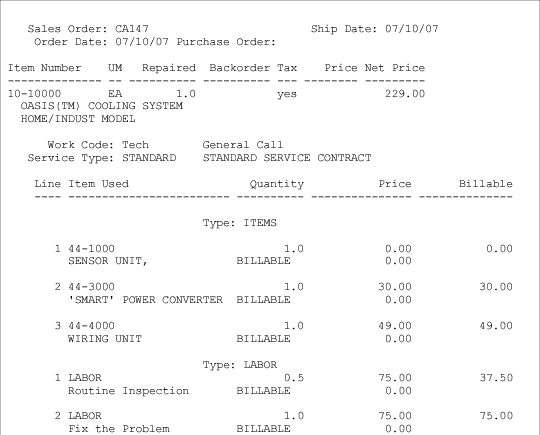
Printed Invoice with Detail is a sample invoice generated with Print Call Invoice Detail set to Yes in Invoice Post and Print. The Invoice Detail field for both the Items and Labor invoice sorts is Yes. As a result, each item and operation prints in detail. You can see the number of hours for each operation and the charge code of BILLABLE.
Printed Invoice with Detail
Use the combination of detail fields to customize the appearance of the invoice.
Use the Print on Invoice field to control the printing of call header comments and line item comments when you create or update comments in Call Maintenance, CAR, and CIR. Comments print for items, labor, and expenses if Print on Invoice is Yes for the comments and Print Call Invoice Detail is Yes when you print the invoice.