QAD 2017 Enterprise Edition
>
User Guides
>
Service/Support Management
>
Call Invoice Recording
>
Understanding CIR Summaries
Understanding CIR Summaries
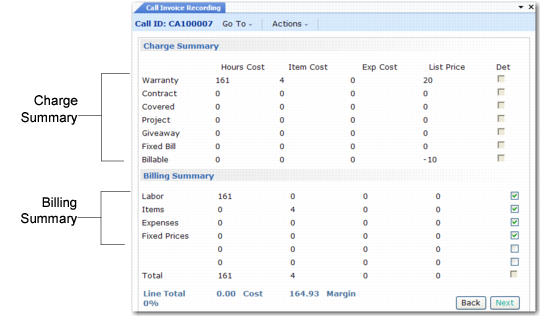
When you enter Call Invoice Recording, a summary frame displays. This summary gives an overview of activity in CAR and the resulting invoice amounts. View the detail frames for more information.
If you did not generate an invoice in Call Activity Recording, the system generates it for you when you enter the summary frame illustrated in
CIR Summary Frames. The invoice includes invoiceable reports for call lines that are complete or closed.
CIR Summary Frames
The top half of the frame shows the charge summary. The bottom half is a billing summary.
Note: In the summary frames, the system rounds numbers to the nearest integer. Only the amounts at the bottom of the frame represent exact quantities. This can cause some confusion. For example, the system rounds up two quantities of 7.5 to 8. The summary total is 16 and the exact total is 15.