Charge Summary
In the Charge Summary, the columns represent invoice sorts and the rows represent types of charge codes:
• The Hrs Cost column displays labor costs, invoice sort type L.
• The Item Cost column displays item costs, invoice sort type I.
• The Exp Cost column displays expense costs, invoice sort type E.
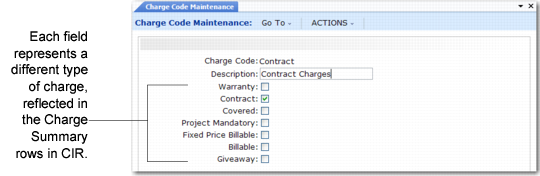
The system separates costs by type of charge code. The seven options in Charge Code Maintenance (11.21.21.1) correspond to the seven rows in the Charge Summary frame.
Charge Code Maintenance (11.21.21.1)
The List Price column displays the total price for items, labor, and expenses for the service activity related to each charge code. The billable list price is usually the same as the total displayed at the bottom of the Billing Summary frame. This is the amount the end user pays for the service.
Note: If you use only fixed pricing, Line Total reflects the Fixed Bill amount. If some call lines use fixed billing and others do not, the fixed billable and billable amounts together represent the line total.
The column labeled Det, Invoice Detail, in the Charge Summary refers to the Yes/No fields in the Billing Summary frame.