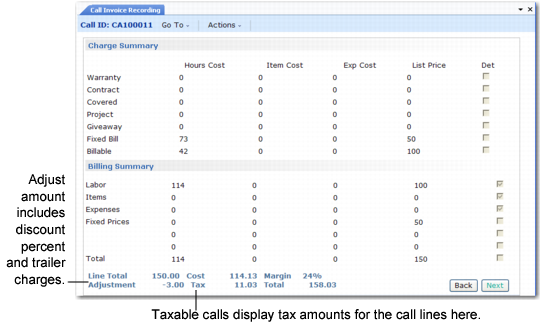
Total Summary Bar
When the Billing Summary frame displays in Call Invoice Recording, a message bar indicates summary totals.
• Line Total represents the invoice amount before adjustments or taxes are added.
• Cost shows the total cost of the service call.
• Margin percentage indicates the call’s gross profit or loss, calculated according to this formula:
Margin = (Price – Cost)/Price
The system calculates the margin using price and costs before it adds taxes and trailer code amounts.
Summary Frame at Completion of CIR
• Adjustment displays discount percent and trailer amounts for the call.
• Tax summarizes the taxable amounts in the trailer.
• Total represents the invoice’s billable amount.