|
Frame
|
Req
|
Purpose
|
|
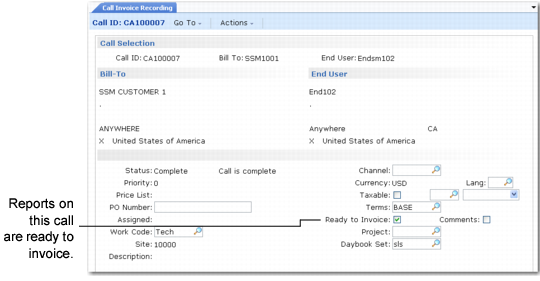
Header
|
Y
|
Select call and display related information.
|
|
Comments
|
N
|
If Comments is Yes, view or update call header comments.
|
|
Summary Frame
|
Y
|
View summary invoice information and set detail fields.
|
|
Item Selection
|
Y
|
Select the call line item to review.
|
|
Comments
|
N
|
If Comments is Yes, view or update call item comments.
|
|
Labor/Expense Totals
|
N
|
Select labor/expense invoice sorts.
|
|
Labor/Expenses
|
N
|
If you enter an invoice sort, view or update its summary data.
|
|
Labor/Expenses Detail
|
N
|
If Det is Yes, view or update detailed information for this invoice sort.
|
|
Comments
|
N
|
If Comments is Yes, view or update operation comments.
|
|
Item Totals
|
Y
|
Select item invoice sort.
|
|
Item Usage
|
N
|
If you enter an invoice sort, view or update summary data for the sort.
|
|
Item Detail
|
N
|
If Det is Yes, view or update detailed information for the invoice sort.
|
|
Comments
|
N
|
If Comments is Yes, view or update item usage comments.
|
|
Trailer
|
Y
|
Enter taxable or nontaxable trailer codes and other trailer information.
|
|
Summary Frame
|
Y
|
View summary invoice information with tax details.
|