Service Engineers
To use the Service/Support Management call tracking functions, you first must identify the individuals who respond to calls.
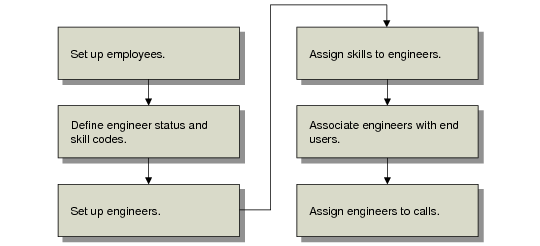
Setting up engineers involves a number of related tasks, illustrated in
Engineer Work Flow.
Engineer Work Flow
First define employees using Employee Create (36.1.7.1). Define engineer status codes with Engineer Status Maintenance (11.13.4) and skill codes in Generalized Codes Maintenance (36.2.13). Set up engineers with Engineer Maintenance (11.13.1). Assign skills with Engineer Skills Maintenance (11.13.5).
You can associate both primary and secondary engineers with end users. The system uses this association to assign default engineers in Call Maintenance or to rank engineers in engineer scheduling.
Engineer scheduling in Call Maintenance is optional. However, even without scheduling, you must define engineers to record service activity in Call Activity Recording.