Defining Engineer Absences
Use two functions to define engineer holidays and absences:
• Set up holidays for a geographic region with Area Holiday Maintenance (11.15.9). See
Area Maintenance.
• Set up scheduled absences for a specific engineer in Engineer Absence Maintenance (11.13.15.17).
The system uses absences you define for the engineer first. If none exist, the system looks for holidays for the call’s service area.
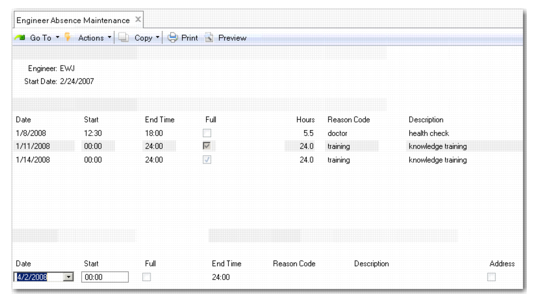
Engineer Absence Maintenance (11.13.15.17) lets you schedule absences for a specific engineer. You can also schedule full-day absences or shorter absences from one hour’s duration, such as health appointments or half days. This flexible granularity lets you record personal appointments, any unusual working hours, or limited availability.
When identifying non-working time, you have the option to assign an exception or reason code to each entry.
The scheduling sequence in Call Maintenance (11.1.1.1) considers an engineer’s scheduled absences. If the day is a holiday or another type of planned absence for an engineer, the engineer displays with zero availability.
Engineer Absence Maintenance (11.13.15.17)
Engineer
Enter the engineer code for the employee. The schedule applies to this engineer only.
Start Date
Enter the date for which to display absence records. The system will display a maximum of six records whose creation dates are nearest the start date entered.
Date
Enter the date for which you want to schedule an engineer absence. The default is the system date.
Start
Enter the time from which the engineer will be unavailable.
Full
Select this field if the engineer will be absent for the entire working day.
Days
Enter the number of days that the engineer will be absent. This field is only available if you select the Full (Days) field.
End Time
If the engineer will be absent for only a portion of the working day, for example, for a doctor's visit, enter the time at which he or she will return to work.
Reason Code
Specify a reason for the engineer’s absence from a list of predefined values. This field is validated against values defined in Reason Code Maintenance (36.2.17).
Description
Enter a description of the reason code.
Address
Select the field if you want to associate an address with the engineer’s absence. Use this field to identify the engineer’s current location when available for work again.
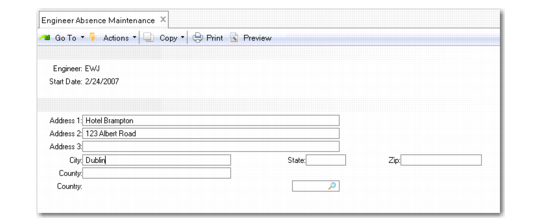
If an engineer is out in the field and must stay the night in order to complete a call, you can define the absence and record the location of the hotel the engineer is staying at. When QAD Field Service Scheduler (FSS) schedules the next end user call the following day, it will know the starting point, or current location, of the engineer. When you select the Address field and click Next, the system displays the Absence Address frame.
See QAD Field Service Scheduler User Guide for more information on FSS.
Absence Address Frame
Address
Enter up to three lines of address details (maximum 36 characters).
City
Enter the city (maximum 20 characters) for the address.
State
Select a valid state or province code for the address.
County
Select a valid county code that identifies the county for this address.
Zip
Enter the postal code or US zip code (maximum 10 characters) for the address.
Country
Specify the country of the address. This field is mandatory.