QAD 2017 Enterprise Edition
>
User Guides
>
Service/Support Management
>
Engineers and Scheduling
>
Defining Scheduling Rules
Defining Scheduling Rules
Engineer scheduling executes as part of Call Maintenance when you set up all required information. To use engineer scheduling in normal call processing, set Schedule New Calls to Yes in Call Management Control. This, in turn, sets the default in the Schedule field of Call Maintenance. Schedule must be Yes in Call Maintenance for scheduling to execute.
The system ranks engineers to assign to a call based on criteria that you design in a control program. You can accept the engineer with the highest rank, or choose another, according to your business practices.
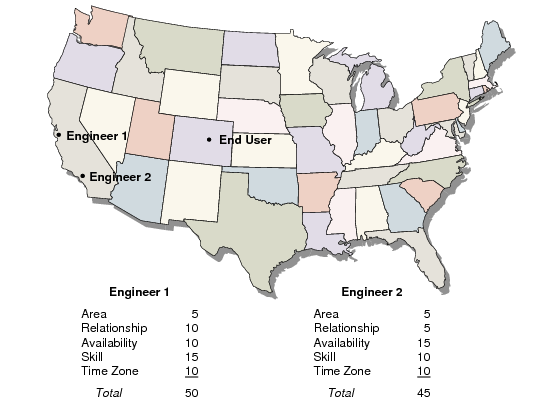
Engineer scheduling considers the following factors:
• Area. Is the engineer located in the end user’s area?
• Primary or Secondary Engineer. Does the engineer have a special relationship with this end user?
• Availability. Is the engineer available during the time the call should be scheduled and how many hours or calls does the engineer have available?
• Skill. Do the engineer’s skills match those required for the reported problem?
• Time Zone (if Multiple Time Zones is active). Is the engineer located in the end user’s time zone, or within a defined range of time zones?
You give these criteria weighted values. Using these values, the system calculates a point total for each engineer for the call. The system then prioritizes the engineers by total points for assignment to the call.
Engineer Scheduling
The system calculates engineer availability whenever it schedules calls. If you have many engineers or complex schedules, these calculations can impact performance. To increase the calculation’s efficiency, specify in the control program which engineers to consider during scheduling.
You can limit engineers to consider for scheduling to:
• Those with available hours or calls on the call day.
• Those with a skill that matches the call problem.
• Those who reside in the same area as the call’s end user.
• If Multiple Time Zones is active, you can also limit scheduling to engineers with the same time zone as the call’s end user, or who have a time zone within a matching offset range. See
Multiple Time Zones for details regarding MTZ.
Consider how to use these options relative to your business requirements. If you have many engineers, reduce the number that the system considers at one time by applying control program limits. To occasionally alter the policy expressed in the control program, you can let users update the limiting rules in Call Maintenance before scheduling occurs.
Limiting scheduling by service area or time zone also affects End User Data Maintenance. The system checks these fields when it assigns an engineer to an end user as the primary or secondary engineer. If either field is Yes, a warning displays if the engineer’s area or time zone area does not match the end user’s.