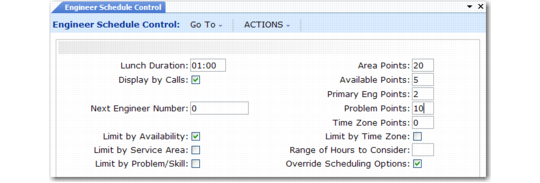
Engineer Point Calculation
Engineer Schedule Control (11.13.15.24) contains settings that form the basis for rules-based scheduling, as well as determining other aspects of the scheduling process.
Engineer Schedule Control (11.13.15.24)
The system subtracts the value you specify in Lunch Duration from the number of hours you scheduled the engineer to work. Display by Calls determines whether the system calculates availability in terms of hours or calls.
Engineer ranking depends on the priorities expressed by the values you define in the control program. Changing these values affects the engineer point calculation and results in different recommendations from the system.
Area Points
If the area you assign to the engineer with Engineer Maintenance (11.13.1) matches the call’s area, which defaults from the end user, the system adds these points to the calculation.
Available Points
The system determines engineer availability by the status you assign in Engineer Maintenance. If this status indicates availability, the system multiplies the availability point value by either the number of hours an engineer is available or the number of calls the engineer can take.
Primary Eng Points
If the engineer is the end user’s primary engineer, the system doubles these points and adds them to the calculation. The system gives the secondary engineer these points without doubling them.
Problem Points
If the code in the Prob/Skill field of Call Maintenance exists in the engineer’s skill table (set up with 11.13.5), the system adds these points to the calculation.
Time Zone Points
The system uses this field with Range of Hours to Consider. If the engineer’s time zone matches or is within the specified range relative to the end user’s time zone, the system adds these points to the calculation. You can update this field only when Multiple Time Zones is active.
The system uses the following formula to calculate points for an engineer:
Area Points + (Available Points * available hours) + Available Points +
(Y * Primary Eng Points) + Problem Points + Time Zone Points
In the formula, Y is 2 for the end user’s primary engineer, 1 for the secondary engineer, and 0 for all other engineers.
The formula weights availability heavily. Also, the end user’s primary engineer gets twice the points from the control program.
Note: The maximum number of points the system displays for an engineer in Call Maintenance is 999. If the scheduling sequence determines a greater value, only 999 displays. Consider this limitation when you assign control program weighting values. If your engineers can take 100 calls a day and you give them 10 points for being available, an engineer without any assigned calls starts with 1010 available points, already beyond the maximum display value.