QAD 2017 Enterprise Edition
>
User Guides
>
Service/Support Management
>
Engineers and Scheduling
>
Engineer Transactions
Engineer Transactions
The system creates transactions to keep track of engineer scheduling information. It creates an engineer transaction record when an engineer is assigned to a call in Call Maintenance, regardless of whether or not you are using engineer scheduling. The main impact of these transactions is in calculating engineer availability when Display by Calls is No.
Engineer Assignment Maintenance
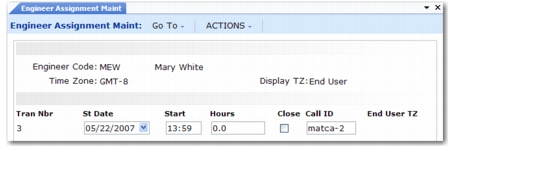
You can create and maintain engineer transactions in Call Maintenance when Schedule is Yes on the header. You can also edit them in Engineer Assignment Maintenance (11.13.15.8). In this program, engineers can access calls quickly and simply to update details for the call transaction.
You can close the call from this program when you finish work for the call if the call has only a single transaction. Close calls with multiple transactions in Call Activity Recording, Call Maintenance, or the Call Queue Manager. To close a call and all its lines, select the Close check box.
Important: Engineer Assignment Maintenance is not for engineers to record time spent on a call. It is a planning function that helps engineer scheduling determine the best candidate for taking a call on a future day and time.
Engineer Assignment Maintenance (11.13.15.8)
Normally, you assign engineers to a call in Call Maintenance. However, modifications you make in Engineer Assignment Maintenance can also affect call assignment in the following ways:
• If no engineer is assigned to a call and a transaction is created, the system assigns the transaction’s engineer to the call. A message displays indicating this change.
• If you delete all transactions for the engineer assigned to a call and no other engineers have transactions for the call, the system sets the Assigned field on the call to blank.
• If you delete all transactions for the engineer assigned to a call and another engineer has transactions for the call, the system assigns that engineer. A message displays indicating this change.
If only one transaction is associated with a call, the system reflects changes you make to the transaction in Engineer Assignment Maintenance in Call Maintenance. When saving the transaction, the system prompts you to allow the transaction’s Start Date and Start Time to update the call’s Next Status Date and Time. The transaction’s hours update the call’s Duration field. You can update the Travel Time field if required.
A call can have more than one transaction. This occurs when the call resolution involves more than one engineer or the same engineer makes several visits to a site. The system enters Start Date, Start Time, and Hours per transaction.
Note: If MTZ is active, select a display time zone before accessing call scheduling transactions. The system replaces the call area field with the end user’s time zone. See
Multiple Time Zones for details on MTZ.