QAD 2017 Enterprise Edition
>
User Guides
>
Service/Support Management
>
Area Maintenance
>
Area Functions
Area Functions
The three main area functions, in addition to reports and inquiries, are:
• Area Maintenance
• Area Structure Maintenance
• Area Holiday Maintenance
The following sections describe these functions.
Area Maintenance
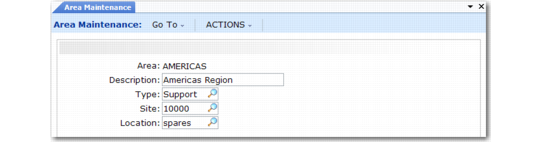
Use Area Maintenance (11.15.1), illustrated in
Area Maintenance (11.15.1), to create, maintain, and delete areas. Before deleting an area, the system verifies that the area is not referenced by an area structure, engineer, on-call schedule, holiday, call, default site, call quote, or end user.
Area Maintenance (11.15.1)
Area
Enter an eight-character code to identify the area. You can use any format.
Description
Enter a brief description (maximum 24 characters) of the area. This description appears in the Areas lookup to help identify the area.
Type
Use this field to classify areas into types. You can use one type of area to designate work centers—for example, CENTER—and another to designate areas for assigning engineers—ENG—if these do not coincide. For example, a work center can handle repairs and returns for Western Canada, while you can assign engineers to a single city or district.
Note: Set up area types with Generalized Codes Maintenance for the field reg_type.
Site
Enter the site representing the place where you obtain repair parts for this area. If the engineer does not have a site and location defined, this site provides inventory issue defaults in Call Activity Recording and Material Order Maintenance.
Location
Beneath the site is location. Using standard location logic, you can maintain specific inventory locations for an area. If the engineer does not have a site and location defined, this location provides inventory issue defaults in Call Activity Recording and Material Order Maintenance.