QAD 2017 Enterprise Edition
>
User Guides
>
Service/Support Management
>
Service Requests
>
Service Request Maintenance
Service Request Maintenance
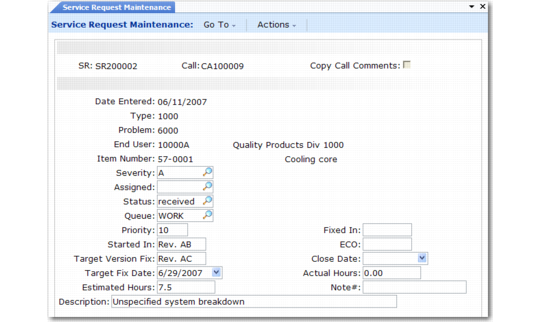
Create service requests with Service Request Maintenance (11.1.15.1), illustrated in
Service Request Maintenance (11.1.15.1).
Service Request Maintenance (11.1.15.1)
SR
When you create a new SR, you can leave this field blank to have the system supply a number based on Service Request Prefix and SR Number in Service Request Control.
Call
If a call initiates the creation of this service request, enter the call ID in this field. When you enter a call, a number of fields default from it, including End User, Item Number, and Description.
Copy Call Comments
When you specify a call, you can copy the call’s comments into the SR as the submitter comments. These comments can provide a description of the problem the SR addresses.
Date Entered
The default is the system date. This field is for reference only and appears on some reports and inquiries. You can also use it to prioritize work.
Type
Specify a user-defined code that can group service requests by type. For example, you can use SR type to assign the SR to the appropriate engineer. Update this field here or from the Service Request Queue Manager. Set up values with Generalized Codes Maintenance for the field srr_type.
Problem
Specify a user-defined code describing the type of problem addressed by this SR. If you set up SR problem codes to match the engineer skills, you can easily assign appropriate engineers. Update this field here or from the Service Request Queue Manager. Set up values with Generalized Codes Maintenance for the field srr_problem.
End User
You must first define end users in End User Create and End User Data Maintenance. Enter the user reporting the problem addressed by this SR. End User defaults from the call if you specify one.
Item Number
Specify the product with a problem addressed by this SR. Validation depends on the setting of Items Must Exist in Service Management Control. If Yes, you must have defined the item with Item Master Maintenance. If No, you can enter any item number. Item defaults from the call if you specify one.
Severity
Specify a code indicating the user’s perception of the severity of the problem reported on this service request. This field is for reference only and appears on selected reports and inquiries. Set up values with Generalized Codes Maintenance for the field srr_severity.
Assigned
Specify the individual assigned to address the problem reported on this SR. Define engineers first in Engineer Maintenance. You can view service requests by assigned engineer in the Service Request Queue Manager.
Status
Specify the position of this service request relative to the SR life cycle. Define status codes first with SR Status Code Maintenance. For a new SR, status defaults from the SR Open Status in Service Request Control. Update this field here or from the Service Request Queue Manager.
Queue
Specify the queue to which to assign the service request. Set up SR queues with SR Queue Maintenance.
Priority
Indicate how important this service request is. Lower numbers indicate higher priority. Update this field here or from the Service Request Queue Manager.
Started In
Enter an optional code that identifies the version of the product that this problem started in. This field is for reference only and appears on selected reports and inquiries. When servicing software, this code can identify the program revision or software release number that the problem was found in. In other industries, this code identifies the product version or drawing that has the problem.
Target Version Fix
Enter an optional code that identifies when or how the correction is to be issued. This field is for reference only and appears on selected reports and inquiries. For software corrections, this code can identify the patch number or software release number expected to include the fix for this problem. In other situations, this code identifies the engineering drawing or revision that includes the correction.
Target Fix Date
Enter the date when this service request is to be completed. This field is for reference only and appears on selected reports and inquiries. Usually, you estimate the number of hours the service request will take and then use this to arrive at a target fix date. This is the date that you promise the customer.
Note: Compare target date and estimated hours with the close date and hours entered on the service request when evaluating service performance.
Estimated Hours
Enter the estimated number of hours it will take to complete this service request. This field is for reference only and appears on selected reports and inquiries.
Fixed In
Enter an optional code identifying when or how you issued the correction. This field is for reference only and appears on selected reports and inquiries. For software corrections, this code identifies the patch number or software release number that included the fix for this problem. In other situations, this code identifies the engineering drawing or revision that includes the correction.
ECO
Enter an optional code identifying the Engineer Change Order (ECO) or Engineer Change Notice (ECN) number associated with the correction for this service request. This field is for reference only and appears on selected reports and inquiries. Many organizations have a numbering schema for keeping track of changes such as ECO or ECN systems. You can use this field for tracking any other numbered document that is associated with the changes made to correct the problems reported on this service request.
Close Date
Enter the date this service request was closed by setting the status to the SR Close Status in Service Request Control. You can delete or archive closed service requests with Service Request Delete/Archive.
Actual Hours
Specify the number of hours it took to complete this service request. This field is for reference only and appears on selected reports and inquiries. You can compare this number to the estimated hours when evaluating service performance.
Note #
Enter an optional code or number referencing engineer notes pertinent to this service request.
Description
Enter a brief description of this service request. Defaults from the call if you specified one. You can include longer descriptions in the submitter comments.