QAD 2017 Enterprise Edition
>
User Guides
>
Service/Support Management
>
Material Orders
>
Material Order Life Cycle
Material Order Life Cycle
MOs have a life cycle similar to a standard sales order, except that no billing occurs. The internal movement of goods in MOs mirrors the standard shipping and distribution process. Whenever possible, standard programs are used. This facilitates learning MO functions for the experienced user, since they are based on familiar processes.
MOs transfer inventory from one site and location to another. They do not support the invoicing features of sales orders. Even though you can drop ship MO items to a customer location, invoicing and taxing only occur as part of the MO consumption in Call Activity Recording.
If you are using advanced shipping features including inventory movement codes and shipping groups, you can generate shipping documents for material orders when the addresses associated with the transfer-from and transfer-to sites or locations belong to a valid shipping group and the inventory movement codes associated with applicable shipping group allow transaction type ISS-TR.
If you are ordering EMT items on MOs, your supplier provides you with the items at the end of the EMT cycle. You then transfer them to the engineer’s location using Material Order Shipments (11.11.6) just as you would with any other item.
For more information on shipping, see
QAD Sales User Guide.
Material Order Life Cycle
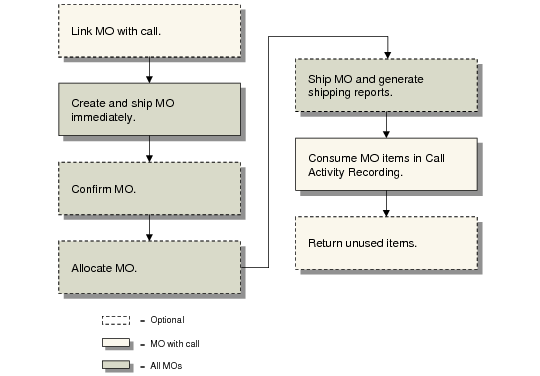
You create MOs in Material Order Maintenance and either link them with a call, for the engineer’s inventory, or expense them. You can ship the ordered items when you create the MO if you allocate and confirm the order.
Otherwise, you can execute separate allocation, confirmation, and shipment functions using Material Order Confirmation (11.11.2), MO Manual Allocations (11.11.4), MO Automatic Allocations (11.11.5), and Material Order Shipments (11.11.6). These functions are similar to their counterparts in the Sales Orders/Invoices module. You can generate a packing list for an MO with Sales Order Packing List (7.9.13). A delivery note is also created as part of shipment.
When ATP Enforcement is Yes in Sales Order Control (7.1.24) and ATP Enforce in the item or item-site record is Warning or Error, the system determines whether inventory will be available to promise (ATP) on the due date. When you enter a confirmed order line and ATP is not sufficient, the system displays a frame with ATP information and options. When you use Material Order Confirmation, you can decide before confirming the MOs whether the system should change order-line due dates to meet ATP requirements.
See
QAD Sales User Guide for information on ATP.
If you are using EMT, MO line items that were marked as EMT type transhippment are allocated automatically to the MO when they are received from the supplier. You cannot use MO Manual Allocations or MO Automatic Allocations for these items.
The system deletes expensed MOs and MOs for the engineer’s own consumption when the orders ship completely. You must consume MOs associated with a call for that call in Call Activity Recording or return unused inventory either in CAR or with MO Direct/Pending Returns (11.11.8). When you have consumed or deleted all items on the MO with a call, the system deletes the MO.
The system provides alternate ways of viewing information about open MOs, those that have shipped, those with items on back order, and those that have items marked as pending return. You can also track the status of EMT purchase orders that have been automatically generated from MOs.