Material Orders
Use material orders (MOs) to manage inventory in a service environment. This chapter defines the types of MOs and their basic maintenance. Following this is a discussion of how MOs are shipped and the other functions you use in conjunction with shipping. Finally, this chapter describes the consumption of MOs in Call Activity Recording and returning items ordered on MOs.
Business ConsiderationsDescribes MOs and how they are used.
Material Order Life CycleDescribes how the MO life cycle works and applies to different types of items and modules.
Creating Material OrdersOutlines how to create MOs by defining data, creating line items, and optionally initiating shipment, as well as describing the different types of MOs.
Material Order MaintenanceDescribes the fields and functions of Material Order Maintenance (11.11.1).
Material Order ATP InquiryDescribes the fields and functions Material Order ATP Inquiry (11.11.7).
Shipping Material OrdersDescribes the two ways to use shipping MOs; by entering the MO as confirmed and allocated in Material Order Maintenance or by executing the confirmation, allocation, and shipping functions separately.
Loading MO Lines into CAROutlines the relationship between MO and CAR.
Returning Items on MOsDescribes the circumstances and procedures for returning items on MOs.
Business Considerations
MOs provide a flexible mechanism for managing inventories in the service environment. With MOs, service personnel, whether in the field or repair center, can order repair parts for specific calls or to replenish their inventory. The MO can interact with call tracking, enabling you to track back orders and manage the relationship between service inventory and call closure.
Use MOs to:
• Issue items that you do not track individually, similar to manufacturing floor stock. These are items that you typically issue in bulk, such as screws or washers, without any detailed usage tracking. This type of MO is an expensed MO.
• Manage inventory moving between a supply center and service locations. The supply center can be a central supply center or one dedicated to service activity. Locations are typically remote locations such as engineers in the field carrying truck stock, or a remote service center. You can also issue the items to a service location within a manufacturing site.
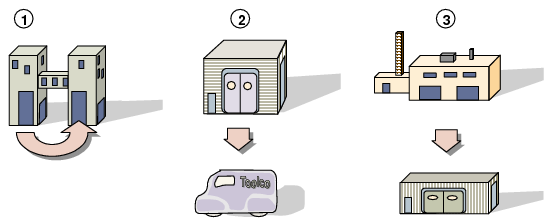
The MO process is not limited by geography. MOs can manage inventory moving between any kind of service entity, mobile or stationary, large or small. The following list indicates three scenarios managed with MOs:
1 Inventory moving between a warehouse and a service department located at the same site or to a service desk in the same building
2 Inventory moving between a home supply depot and a fleet of service trucks
3 Inventory moving between a central warehouse and a repair center or refurbishment shop
These scenarios are illustrated in
MO Inventory Management.
MO Inventory Management
If the engineer works at a repair center and you issue items to the call directly from the repair center site, you may not need to use MOs.
MOs are most useful when the engineer works remotely, such as out of a repair truck or van. In this case, you need an additional inventory transaction to move inventory from the site or location where repair parts are stocked to the engineer’s site or location where you can issue and consume the inventory on the call.
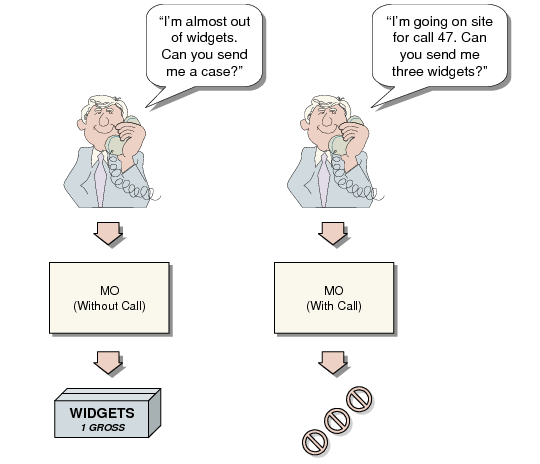
MOs that transfer inventory are divided into two types:
• Items you order to replenish general service stock
• Items you order to meet the requirements of a particular call
MO Tracks Inventory for a Call
Based on the structure of your supply chain and your supplier relationships, you might consider using Enterprise Material Transfer (EMT) for some MO items. EMT lets you automatically generate a purchase order from an MO.
See
QAD Sales User Guide for details on EMT.