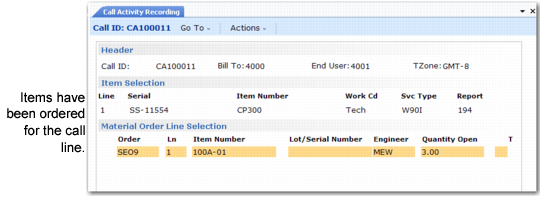
Material Order Selection Frame
When you select a call line item in CAR that has one or more open MOs, the Material Order Selection frame displays.
Loading MO Lines in Call Activity Recording (11.1.1.13)
The selection frame displays all open MO lines for the call line. An MO line is open when the quantity shipped on the MO is greater than the quantity consumed plus the quantity returned.
Select or deselect MO lines as needed. An asterisk (*) indicates selection. To leave the scrolling window and continue processing, click Next. After you finish the selection, the system loads the items ordered on the MO into item usage records in CAR. Click Back while in the scrolling window to return to Call Activity Recording without loading any MO lines.
A user in CAR can select an item ordered on an MO for this call by a different engineer; however, the system displays a warning. The system validates each loaded line and displays standard CAR warnings and errors.
For each MO line you select, the system creates one item usage record. Internally, each item usage record remains linked to the MO line so it is recognized later when you update quantities. As a result, if items on an MO are not yet accounted for, the MO remains on the list of open MOs that you can select the next time you process this call item.