QAD 2017 Enterprise Edition
>
User Guides
>
Service/Support Management
>
Depot Orders
>
Depot Order Maintenance
Depot Order Maintenance
Use Depot Order Maintenance (11.1.2.1) to manage depot orders. Depot orders cannot be created manually: a depot order is a service call that is associated with a work code that has Repair Center set to Yes.
The header frames of Depot Order Maintenance contain fields that display information defaulted from the call: call ID, sold-to, bill-to, name and address, and ship-to information. Other fields are used to record receipt and delivery data. The Confirmed field defaults to Yes; it can be set to No to indicate that customer authorization for the repair has not yet been received. Other fields on the headers contain tax environment, salesperson, and freight-related information.
When entering information about a specific line item, you indicate the repair type for the item: Repair or Replace. If Replace is selected, the system automatically generates a second depot order line with a repair type of Replacement.
You use the Item Repair Data frame to record information about the item repair; for example, if the repair type is Replacement, you can specify an alternate item ID. The alternate item ID would then be used by the system when a repaired end-item is returned to inventory (that is, restocked) rather than sent back to the customer. Restocked items often use an alternate item ID to indicate they are restocked, as opposed to new, items.
You also can use the Item Repair Data frame to record BOM code, routing, service type information, and pricing information. You can use either fixed pricing or time and materials pricing types.
Use the Item Receipt frame to record receipt information for the returned item: receipt date, quantity, site, and so on. An Item Receipt Shipment Data frame displays shipment information, such as the actual date of shipment; this frame is updated when the repair or replacement item is shipped out using sales order shipments or the workbench.
If a depot order line is identified as being a replacement repair type, an MO is created automatically for this line using the alternate item ID if one has been specified on the depot order; otherwise the MO uses the item ID. The remainder of the information required to create the MO defaults from the depot order/call. The system uses the existing credit checking functionality to ensure that the order does not exceed authorized credit limits.
Use the Depot Order browse (11.1.2.2) to view information about current depot order records, such as status of the call/call line, receipt, and shipment dates.
Depot Order Maintenance Flow
Depot order maintenance occurs in the following order:
1 Fill out the Depot Order Maintenance header, including customer, end user, and call, and coverage information specific to depot order processing. This sets up default values for line item issues and receipts.
2 Specify items to be shipped to the customer.
3 Specify items to be received from the customer for repair or replacement.
4 Enter trailer information, including trailer codes, tax, and standard credit information.
5 Complete the trailer that totals billing amounts and trailer codes.
6 Optionally ship or receive directly from Depot Order Maintenance. You can also use the separate ship and receive functions.
Header Frame
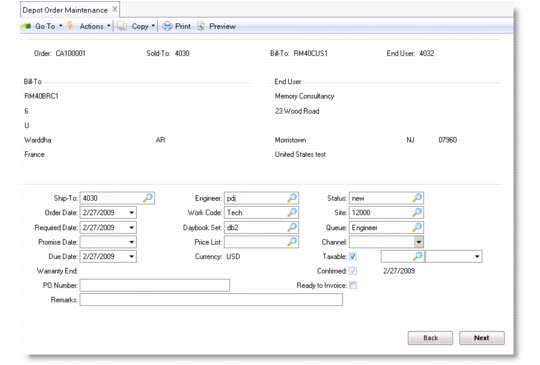
Depot Order Maintenance (11.1.2.1), Header Frame illustrates the header frame that displays basic identifying information about the depot order. Many field values are defaulted from the call information.
Depot Order Maintenance (11.1.2.1), Header Frame
Order
Enter a valid depot order number. Valid order numbers are those for service calls that are associated with a work code that has Repair Center set to Yes.
Sold-To
This read-only field displays the customer associated with the call’s end user.
Bill-To
Specify the address code assigned to the bill-to location for the customer associated with the call’s end user. Bill-to defaults from Customer Maintenance. If a bill-to has not been specified, the sold-to address defaults.
You can change the bill-to only the first time through Depot Order Maintenance.
Credit limit, terms, and currency default from the bill-to address. This bill-to address is printed on invoices, and all accounts receivable activities reference this bill-to address.
End User
Defaults from the bill-to address.
Ship-To
Defaults from the End User ID. If you update it, the value must be a valid ship-to assigned to the sold-to.
Order Date
Displays the call date of the associated call. Order Date defaults from the system date. You can change this value. For example, if you take an order over the phone and do not enter the order into the system until three days later, you can change the date to reflect the day you took the order.
Required Date
Enter the date on which the customer requires the item to be delivered. If left blank, this field defaults to the due date.
Promise Date
Indicate the date the customer was promised delivery. The promise date can be different than the due date. Promise dates include delivery transit time, while due date is the date the items must be ready for shipment.
Due Date
Enter a date on which the repaired item is due to be shipped.
Warranty End
This read-only field displays the warranty end date based on the warranty duration and install date.
PO Number
Specify a purchase order number for the item associated with this call. This field is required if the end user reporting the problem has been defined in End User Data Maintenance as requiring a purchase order.
Remarks
Any remarks specified for the sold-to customer display by default. You can change these to make them specific to this depot order. Remarks display on printed documents.
Engineer
The code identifying the engineer assigned to the call displays by default. The employee name of this engineer displays next to the code.
Work Code
Defaults from the call. Work codes designate what type of work is performed during service activity. You can enter another work code that has Repair Center set to Yes, if required.
Daybook Set
Enter the daybook set that will be used when this order is invoiced. This value defaults from Customer Data Maintenance. At Invoice Post and Print, the system assigns an invoice number based on one of the daybooks in the specified set.
Price List
This read-only field displays the price list used to calculate the line item price. For a replace line, this value will always be 0.
Currency
Defaults from the currency of the customer bill-to record associated with this call. The first time through, you can select any currency, but after you move to the next frame, you cannot change the currency.
Status
Enter an 8-character code identifying the call status. Calls that have been recorded but have not yet been acted upon are typically given a New status. Once the associated item has been inspected and the customer has accepted the service quote, the status must be updated to indicate the depot order/call can be acted upon.
Site
Indicate the inventory site where repair parts for the item being serviced reside. Depot Order Maintenance uses the site when parts are issued in the repair of this item.
Queue
Defaults from the call and indicates the queue to which you assigned this call. Set up queues with Call Queue Maintenance (11.1.21.7).
Channel
Specify an optional code identifying the distribution channel through which this depot order originated. Channel can be used to determine GL sales and COGs accounts affected by inventory transactions. This field is validated against Generalized Codes Maintenance (36.2.13).
Taxable
Enter Yes if activity for this call is subject to tax; otherwise, enter No. The tax status defaults from the end-user tax data.
Confirm
The default is Yes. You can set this field to No to indicate that customer authorization for the repair process has not yet been received. This field must be set to Yes in order to ship items against this order.
Ready to Invoice
This field is initially set to No. After you have shipped or received items, the system sets it to Yes. Invoice Post and Print examines this field. It must be Yes before you can post the invoice. You can change the field to prevent invoicing. If you ship more items later, the system sets Ready to Invoice to Yes so the depot order can be selected the next time invoices are posted.
Ready to Invoice cannot be set to Yes if an open MO exists. In addition, for a repair or replacement line, at least one shipment line must have been shipped. For a replace line, the line must be completed.
When you click Next, the tax environment pop-up window displays fields related to the tax usage, tax environment, and so on. These fields default from the depot order header. For details about these fields, refer to
QAD Financials User Guide.
When you click Next, the pop-up window exits and the second header frame of Depot Order Maintenance displays.
Second Depot Order Header
For depot order lines that are not replace lines, a second header frame displays when you click Next on the first header frame.
Second Depot Order Maintenance Header Frame
Salesperson 1
Defaults from the sales person for the sold-to address. Identifies the salesperson to receive commission and quota credit for this depot order. The salesperson information on each line item defaults from the salesperson and commission rate on the header. You can change it on each line item. To change the salesperson on a line item, set Multiple to Yes.
Multiple
Indicate whether more than one salesperson is responsible for this depot order. If this field is Yes, a pop-up window prompts you to enter up to four salesperson codes.
Commission 1
Specifies the commission percentage this salesperson is to receive. Besides the normal commission rate for the salesperson, you can enter commission rates for sales to specific customers or sales of specific product lines.
Freight List
Defaults from the freight list for the sold-to address. Freight list codes identify a set of shipping rates for different zones and shipping weights or units. The freight list on the header sets the default for each line item.
Freight Minimum Weight
Defaults from the freight minimum weight for the sold-to address. This field is the minimum weight on which to base the shipping charge if the freight list type is bulk. This field does not apply to freight lists of type unit. For bulk freight lists, shipments that weigh less than this amount are charged based on a minimum weight charge, not the shipment weight.
Freight Terms
Defaults from the freight terms for the sold-to address. The freight terms determine how the system applies freight charges. They can be added to the order trailer, added to the unit cost for each ordered item, displayed as a freight allowance, or not calculated.
Calculate Freight
Defaults to Yes for a new order; otherwise, defaults to No. If Yes, the system calculates site- and currency-specific freight charges on RMAs. Charges can be calculated for the line item’s shipping weight for unit price lists or for the order’s total shipping weight for bulk price lists. Calculated freight charges appear on the trailer.
Display Weights
Specifies whether to display the Freight window for each line item, which enables you to enter or modify data in the Freight Class and Freight Ship Weight fields. For inventory items, these fields default from the item master. For memo items, you must specify them. The Freight window also shows information the system uses to calculate freight for the line item, so you can review freight amounts easily.
Line Frame (Repair Data)
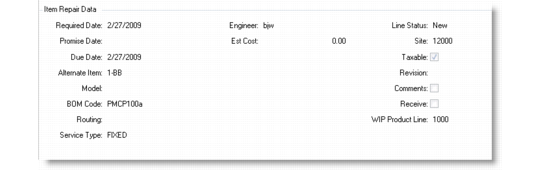
When you click Next on the second depot order header frame and select the item, the Item Repair Data frame displays. This frame allows you to record information about repair dates, pricing details, alternate item ID, and so on.
Item Repair Data Frame
Item Number
Specify the number of the item requiring service. If the end user supplied an installed base serial number, the system fills in this field. If this item is in the installed base, it must belong to the end user entered previously.
Quantity
By default, this field displays the quantity of the item from the ISB. For a repair line, if the work code is not fixed, this field can only contain a value of 1.
Unit of Measure
This field defaults from Item Master Maintenance.
Lot/Serial
This field defaults from the call line item.
Repair Type
Indicates the type of the repair being performed to the returned item. You can modify this field when the value is Repair.
Required Date
Enter the date on which the customer requires the item to be delivered. If left blank, this field defaults to the due date.
Promise Date
Indicate the date the customer was promised delivery. The promise date can be different than the due date. Promise dates include delivery transit time, while due date is the date the items must be ready for shipment.
Due Date
Enter a date on which the repaired item is due to be shipped.
Alternate Item
If entering a replacement line, you can enter an alternate item number for the depot order line. This value is used only for internal tracking by the system.
This field is used when a repaired end-item is to be returned to inventory (restocked) rather than returned to the customer. Restocked items often use a different item number to indicate they are repaired items, not new items.
The Alternate Item is the item ID for inventory issued out of the stockroom on an MO, consumed against the depot order, and then shipped to the customer. The item number, not the alternate item number, is invoiced.
This field can be left blank even if the order line is for a replacement item. In this case, you may want to retrieve from inventory and ship to the customer a new item as opposed to a rotable/restocked item.
Model
Enter the model number associated with this item. Many organizations service products by model.
BOM Code
Enter a valid service BOM for the part set up with Service Structure Maintenance.
Routing
Enter a valid routing code for the part set up with Service Structure Maintenance.
Service Type
This field defaults from the call. If necessary, you can modify this value. Enter a service type defined in Contract or Warranty Type Maintenance.
This value can be updated only if no activity has been posted against the order/call, or if the status of the order/call is complete and it is ready to be invoiced. No changes can be made to the service type if the line has been either partially or fully invoiced.
The service type for a replacement line cannot be changed and is read-only. This constraint ensures that the service type of the replacement line matches the service type of the corresponding replace line.
Engineer
The code identifying the engineer assigned to the order/call displays by default. The employee name of this engineer displays next to the code.
Estimated Cost
Enter an estimated cost if using fixed pricing; the system calculates charges using the value entered. If time and materials is used, the field defaults to blank.
Note: When setting a repair type line to complete, the value in the Estimated Cost field is updated according to the actual price logged in Call Activity Recording.
Line Status
Defaults from the call line. Before a replacement (or a returned) item can be shipped back to the customer, the line status must be complete.
Site
Defaults from the previous instance of this field in the first header frame.
Taxable
Enter Yes if activity for this call is subject to tax; otherwise, enter No. The tax status defaults from the end-user tax data.
Revision
Revision is used to track the revision level of the part that requires service, which may differ from the current revision level of the item in the Item Master. This value defaults from the Item Master but can be updated if required.
Comments
Defaults to Yes if comments exist; otherwise defaults to No. If Yes, the standard comments frame displays when you click Next, so you can enter or review comments associated with this item.
Receive
Controls whether the system displays a warning message for items that have already been received.
Yes. The system displays a message if the item has already been received. You have the option to continue or to cancel. The system will display the Item Receipt frame.
No. The system will not display a message if the item has already been received. The Item Receipt frame will not be displayed.
Line Frame (Receipt/Shipment Data)
Use this frame to review shipment data, such as activity (repair receipt, repair shipment), actual date of activity completion, and so on; these fields are read-only. The data on this frame updates when the repair or replacement item is shipped using sales order shipments or the workbench.
Receipt/Shipment Data Frame
Reference
This field defaults from the call line item. Lot reference, site, location, and lot/serial number specifically identify inventory quantities.
Transaction Type
Indicates the type of the transaction. Possible values are Repair Receipt, Repair Shipment, or Replacement Shipment.
Quantity
By default, this field displays the quantity of the item from the ISB.
Estimated Date
Displays the estimated date for completion of this transaction type.
Actual Date
Displays the actual date for completion of this transaction type.
Site
Defaults from the depot order header or from the customer site.
Location
Displays the inventory location at the site from which the items are being issued.
Item Receipt Shipment Data Frame
Use this frame to record receipt details of the depot order item. Several fields on this frame—Item Number, Description, and Item Type, Unit of Measure, and End User—default from the depot order header or the call/call line.
Note: This frame displays when the Receive field is set to Yes on the Repair Data frame.
Item Receipt Frame
Item Number
This field defaults to 1.
Description
Enter a brief description (maximum 24 characters) of the code identifying its use and purpose.
Item Type
Defaults from the call/call line and validated against generalized codes. The value can be SW (software), S (system), or O (other). You can add codes in Generalized Codes Maintenance.
Lot/Serial
This field defaults from the call line item.
Quantity
By default, this field displays the quantity of the item from the ISB.
Unit of Measure
This field defaults from Item Master Maintenance.
Receipt Date
This field displays the value entered in the Actual Date field in the Receipt/Shipment Data frame.
Site
Defaults from the previous instance of this field in the Receipt/Shipment Data frame.
Location
Defaults from the previous instance of this field in the Receipt/Shipment Data frame.
End User
Displays the end user that the item is currently associated with.
Trailer Frame
The trailer is the same as that for a sales order and displays charges, credits, and information for shipping and invoicing. Most trailer fields—including include CR Initials, Credit Card, Action Status, Partial OK, and Ship Via—default from the bill-to address.