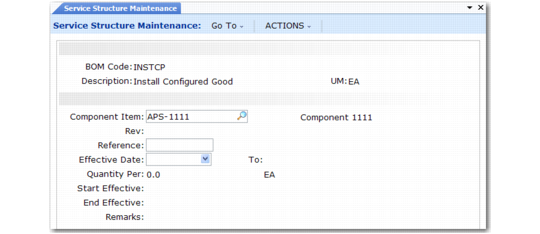
Service Structure Maintenance
Specify the details for service BOM codes in Service Structure Maintenance (11.19.5). This program uses only a subset of the fields displayed in Product Structure Maintenance. These two functions are similar. However, there is an important difference. The parent item of a service structure must be a service BOM code; it cannot be an item defined in the item master. You can create the service BOM code here or with Service BOM Code Maintenance (11.19.1).
Service Structure Maintenance (11.19.5)
BOM Code
If the BOM code does not exist, the system prompts you to create it. Specify an 18-character code identifying a service product structure, or BOM. Parts or components used in the service of an item are grouped under a BOM code. The parent item cannot be an item defined in the item master or a manufacturing BOM code, but must be a service BOM created here or in Service BOM Code Maintenance. To maintain the relationship with the item being repaired, you can use a prefix or suffix naming convention.
Description
Enter a brief description (maximum 24 characters) of this service structure. This description displays when you reference the structure.
The next four fields—component item, revision, reference, and effective dates—comprise a key for the last four fields.
Component Item
You can specify any item defined in the item master as a part of this service structure, except configured items. You can also use another service or manufacturing BOM. You can use a formula item defined in the item master. You cannot specify a formula BOM.
Rev
If you select an item master item as a component, its current revision number displays.
Reference
Use a reference number to specify the same component more than once in a service structure. The reference number defines this item’s position when the BOM is exploded.
Effective Date
Starting and ending effective dates are inclusive and cannot overlap. The default is blank. This field indicates the first day this parent/component relationship is to be effective, and is part of the key in searching for a quantity to use.
Quantity Per
The quantity of the component item needed during the service activity. When you print a repair work order, call quote, or call report, the system lists each component item and the quantity required to perform the work. The system loads Quantity Per into the Item Usage frames in Call Quote Maintenance and Call Activity Recording as Qty Used.
Start Effective and End Effective
Starting and ending effective dates are inclusive and cannot overlap. You can leave one or both dates blank, which is the default. They indicate the first and last day this parent/component relationship is to be effective. Effective dates phase in engineering changes and maintain product structure history.
Remarks
Enter a brief comment describing this component’s use.