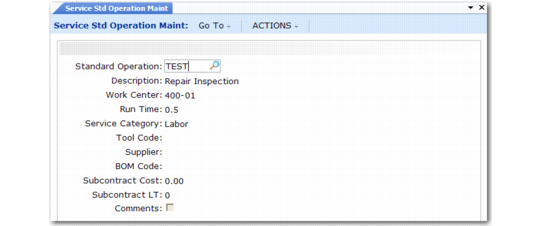
Service Standard Operation Maintenance
A standard operation represents a process or operation common to the service of several products or applicable to different service routings in different operation sequences.
Standard operations supply defaults for service routings when you define them with Service Routing Maintenance. You can also access them from the Labor/Expenses frame in Call Activity Recording. For example, when you reference a standard operation, the system supplies information about the service category and the amount required to complete the operation by default.
Service Standard Operation Maintenance (11.19.21) is similar to Standard Operation Maintenance (14.9). Only a subset of the fields used in manufacturing operations is used in service. You can modify non-service standard operations with this function, but a warning appears.
Note: You can use both service and manufacturing standard operations in service routings or in CAR.
Service Standard Operation Maintenance (11.19.21)
Standard Operation
Enter a code identifying an operation common to the service of several products or applicable to different service routings in different operation sequences.
Description
Enter a brief description (maximum 24 characters) of this operation. Description defaults into the Description field when you use this operation on a routing step. Include more detailed information in the comments.
Work Center
Can be either a manufacturing work center defined in the Routings/Work Center module or a service work center defined with Service Work Center Maintenance. Work Center defaults into the Work Center field when you use this operation on a routing step. The work center provides costing information for labor reported in Call Activity Recording.
Run Time
Approximate number of hours required to perform this operation. The run time defaults into the Run Time field when you use this operation on a routing step. It also defines the quantity used in the Labor/Expenses frame of CAR when you reference this operation.
Service Category
The service category for the labor used during this operation. Use the service category to control the financial flow of service activity into GL accounts. Select a labor or expense service category. If not defined, the system uses the Default Labor Service Category value in Call Management Control.
Tool Code
The tool associated with this operation. Defaults into the Tool Code field when you use this operation on a routing step. Set up tool codes in Generalized Codes Maintenance for field ro_tool.
Supplier
The address code of the normal, or preferred, supplier for this subcontract operation.
BOM Code
The product structure defining components to be used during this operation. A warning displays if this is not a service product structure. This BOM is loaded as item usage for the operation when specified on a routing. The BOM associated with a service item is loaded into the first operation without items of its own.
Note: If you want more control over how items are loaded in CAR, create service BOMs that include only the items used at an operation, then associate the BOM with the correct routing step.
Subcontract Cost
Indicate the cost of subcontracting this operation step. Defaults into the Subcontract Cost field when you use this operation on a routing step. If you specify a subcontract cost, leave run time blank. This field is not used for service routings.
Subcontract LT
The average number of shop calendar days it takes a subcontractor to perform this operation. This field is not used for service routings.
Comments
If Yes, enter comments. These default into the routing when this standard operation is referenced and print on the call to give the engineer detailed instructions for servicing an item.