Linking Receipts to Issues
The Issue Line Detail frame in RMA Maintenance contains a logical Rec (receipt) field. Set this field to Yes to display a pop-up window where you can create a receipt corresponding to an issue. The item on the current RMA issue line is the default receipt line item, and the system links the two lines. Use this feature for one-to-one part replacement.
Linking RMA Issues and Receipts
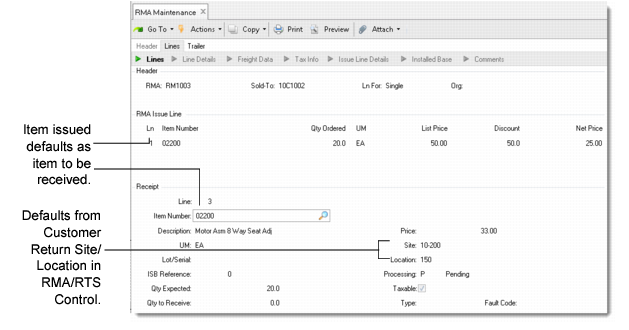
In this example, an RMA issue line item is created for an item 02200. If the Receive field is Yes, the item number 02200, unit of measure, quantity, and ship type default from the issue line.
Note: The item number on a linked receipt does not have to be the same as the issue line item. You can change it only when you first create the line. If you do change it, the system prompts you to confirm the change before it saves the line.
The default site is the customer return site in RMA/RTS Control. This link works only if you are both shipping and receiving in real time—that is, right away.
When you create a receipt line for an issue line by setting Rec to Yes, the system links the two lines. The system checks the value of Ship Before Return on the service type only when lines are linked.