Releasing RMAs to Work Orders
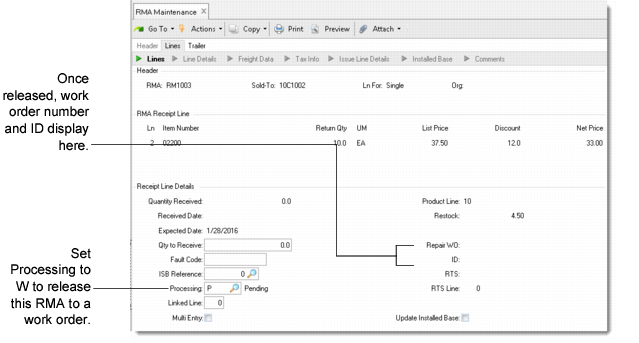
Some service organizations use standard manufacturing operations to refurbish items received from customers on an RMA. To do this, specify W (work order) as the processing option on the RMA receipt line item.
Processing Option
The default processing option is P for pending. You can change this to W at any time.
Example: When you create the RMA receipt line, you do not know if a work order is needed, so you set Processing to P. When the item is actually received and inspected, you determine a work order is required. At this point, you can go into RMA Maintenance and enter W in the Processing field.
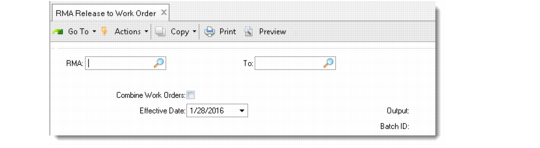
Use RMA Release to Work Order to create rework orders for all RMA receipt lines with a quantity already received and a W processing option. Rework orders have a Type R.
Releasing RMA to Work Order
You can choose to combine work orders. In this case, you can summarize RMAs for a single item and site, unless it is serial-number controlled, on one repair work order. Otherwise, one work order is created for each RMA.
The system always creates individual work orders for serial-number controlled items by using a unique ID, so the components used in the repair can be identified.
The system creates the work order number by taking the RMA number and appending the receipt line number, using a period as a separator. For example, for RMA9 and receipt line 3, the work order number is RMA9.3. The system stores this number and the work order ID on the RMA. View it in RMA Maintenance in the Receipt Line Details frame.
Note: When Combine Work Orders is Yes, the RMA number used for the work order number is the first RMA with a line released.
If the item being repaired has an associated repair routing in Service Item Maintenance, the system uses the repair routing to determine the operations on the work order. The work order type is R, indicating a rework order.
Note: You cannot release an RMA with a non-blank action status to a work order. A non-blank action status indicates that the RMA is on credit hold.