QAD 2017 Enterprise Edition
>
User Guides
>
Service/Support Management
>
Control Programs
>
Call Escalation Control
Call Escalation Control
The Use Escalation setting in Call Management Control (11.1.24) indicates whether or not to use escalations. If this field is No and you access Call Escalation Control (11.1.13.24), a warning displays asking if you want to enable escalations.
If you respond with Yes to this message, the system changes the setting in the call control program, enabling you to modify the escalation control program. If you respond with No, you cannot specify values for these fields.
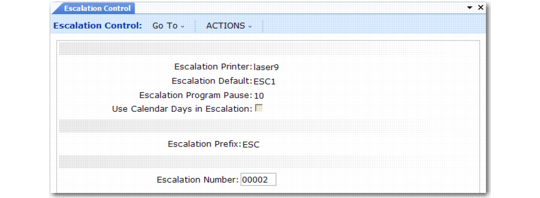
Call Escalation Control (11.1.13.24)
Escalation Printer
Dedicated printer used by the Escalation Monitor (11.1.13.13) to print call reports. Must be defined in Printer Setup Maintenance (36.13.2). When Print is Yes for an escalation step, the system sends the call report to this printer.
Escalation Default
Must be an escalation code defined with Escalation Maintenance (11.1.13.1). If you use escalations, the system searches for a default escalation code in Call Maintenance (11.1.1.1) in the following order: escalation defined for the end user, escalation defined in Call Default Maintenance, escalation defined in Service/Support User Preferences, escalation defined in the control program.
Escalation Program Pause
Number of seconds the Escalation Monitor (11.1.13.13) pauses before restarting a cycle. Set this interval to a value less than the shortest period of time in any escalation. If the shortest amount of time between two sequences is zero days and four hours, which the system calculates by summing the Days Allowed in Status and Time Allowed in Status fields in Escalation Maintenance, then set Escalation Program Pause to a value less than four hours.
Use Calendar Days in Escalation
This field sets the default for the Use Calendar Days in Escalation field in the Escalation Monitor. It determines whether to use calendar days or workdays to calculate Next Status Date. The formula is: today’s date + Days Allowed in Status from the current escalation step.
• If Yes, the system uses calendar days in the calculation. If the Next Status Date resolves to a non-workday as determined by the warranty or service type, the system advances the date to the next workday.
• If No, the system uses only work days in the calculation, excluding non-workdays. When No, the calculated date is either the same or later than the date calculated with a value of Yes.
Escalation Prefix
Used with the Next Escalation Number for automatic numbering of new escalations. Prefixes help to distinguish between different types of codes.
Escalation Number
The next number the system assigns in Escalation Maintenance (11.1.13.1) if the Escalation field is blank. Escalation numbers begin with a prefix, followed by the next sequential escalation number. The system increments this next number and displays it here.