QAD 2017 Enterprise Edition
>
User Guides
>
Service/Support Management
>
Control Programs
>
Paging Control
Paging Control
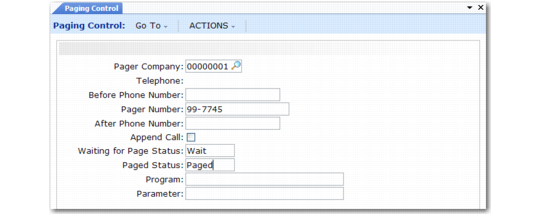
Settings in Paging Control (11.13.17.24) establish the connection with your communications application.
Paging Control (11.13.17.24)
Pager Company
Specify the company supplying your paging services. This should be defined as a valid, active supplier in Supplier Create.
Telephone
The system displays the pager company’s phone number from its associated supplier record.
Before Phone Number
Parameters to pass to the dialing program before the phone number string. An example for UNIX systems using the cu program:
-s 9600 -l tty1A
Pager Number
The pager number to use in Call Maintenance if the Pager field of Engineer Maintenance is blank.
After Phone Number
Parameter string to pass to the operating system after the pager phone number. Some dialing programs require an escape sequence after the phone number to hang up the line or reset the modem.
Append Call
Not used.
Waiting for Page Status
Not used.
Paged Status
Not used. The value written to paging history signifying that an engineer has been paged.
Program
Path and program name for the communications application. For UNIX systems using the cu program:
/usr/bin/cu
Parameter
Parameters that follow the Program field, if you need more space than is available in the Before Phone Number field.