QAD 2017 Enterprise Edition
>
User Guides
>
Sales
>
Sales Quotations
>
Repricing Sales Quotes
Repricing Sales Quotes
You may need to change the price of items on sales quotes, particularly when the product is commodity-based. Sales Quote Repricing (7.12.8) uses the same logic as Sales Quote Maintenance to recalculate the price of eligible lines on the selected sales quotes. Tax is also recalculated, if applicable.
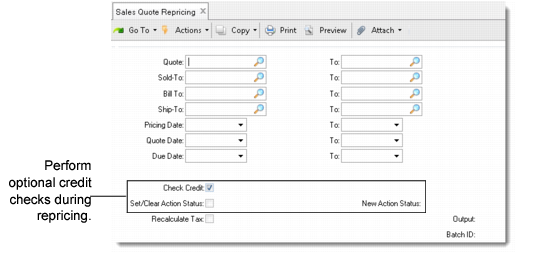
Sales Quote Repricing (7.12.8)
Enter criteria to select quotes for repricing. If you leave the selection criteria blank, the system reprices all eligible quotes using the best pricing algorithm and recalculates quantity breaks and discounts. Only quote lines with Fixed Price set to No are included. See
Sales Orders/Invoices for more information on repricing.
As a part of the update process, you can optionally perform credit checking and update credit action status based on the newly calculated prices.
Check Credit
If No, the following two fields are skipped and no credit checking is performed.
Set/Clear Action Status
If Yes and the quote exceeds the customer credit limit, the Action Status is updated to the New Action Status. If a quote on hold is now found to be within the customer credit limit, the action status is cleared.
New Action Status
Specify the new action status to place on quotes that exceed the customer credit limit. If left blank and Set/Clear Action Status is Yes, the system automatically resets the action status to HD (hold).
Recalculate Taxes
Indicate whether to recalculate tax amounts for the quotes being repriced. Tax recalculation overwrites any manually updated tax values.
The update report shows both the old and new price and the discount for all lines changed. The quantity ordered determines the price, but the open quantity is printed on the report. The update creates transaction history records for all lines changed.