Sales Orders/Invoices
You can manage all aspects of sales order and invoice processing, including creation, confirmation, allocation of inventory, shipping, and posting. This chapter describes the following topics.
Related training material is available in the QAD Document Library. See
QAD Sales Orders Training Guide. Sales Orders/Invoices Overview
Describes the sales order/invoice process.
Creating Sales Orders
Illustrates how to create sales orders using Sales Order Maintenance.
Calculating Promise and Due Dates
Describes how to set up the system to perform automatic date calculations on sales order lines and issue lines on return material authorizations (RMAs).
Running Credit Checks
Describes how the system verifies the bill-to customer’s total current liability.
Processing Freight Charges
Outlines how to manage various tasks for processing freight charges.
Repricing Sales Orders
Details how to reprice items on sales orders using Sales Order Repricing.
Printing Sales Orders
Describes how to print a sales order, including the header, line items, and trailer, using Sales Order Print.
Printing Picklists
Describes how to print a picklist for a sales order using Sales Order Packing List.
Shipping
Details how to ship an order using Sales Order Shipments.
Managing Containers and Shippers
Describes how to record, confirm, and delete/archive container and shipper information using Containerization Menu and Shipment Processing Menu.
Processing Invoices
Details how the system automatically creates a pending invoice, which you can then print in draft format, review, update as needed, and then post and optionally print.
Correcting Invoices
Shows how to correct invoices using Sales Order Maintenance and additional functions.
Processing Returns
Details how to process returns using sales order functions. You can also process returns using the Return Material Authorization feature of Service/Support Management.
Generating Reports
Describes how to generate reports about sales orders and invoices.
Sales Orders/Invoices Overview
A customer sale can begin as a sales order or a sales quote. Both represent offers to sell the customer certain items at a certain price at a certain time. The sales order also represents a commitment from the customer to purchase the items, but a sales quote does not. So, sales quotes are not considered by MRP.
When a customer accepts a sales quote, the quote is released to a sales order. Information from the sales quote is automatically transferred to the sales order.
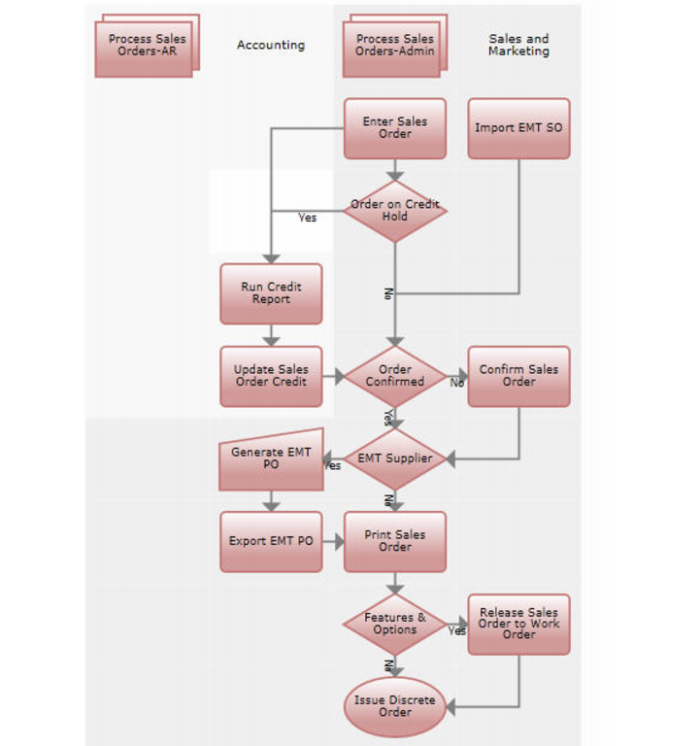
Sales Order Process shows the sales order process.
Sales Order Process
The system supports a number of different shipping methodologies, from the simple to highly complex. The most simple methods are discussed in this chapter. Other shipping methods are discussed in . See
here for details.
Once invoices are posted, financial processing continues with accounts receivable functions. See
QAD Financials User Guide for details.