Creating Correction Sales Orders
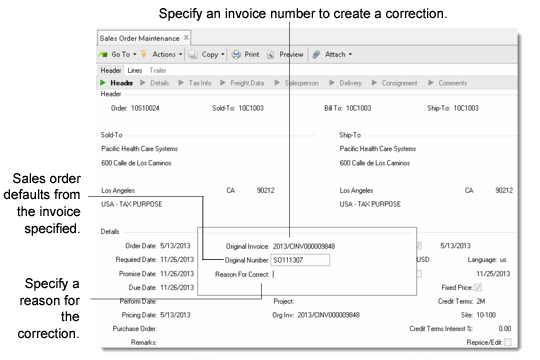
When Use Correction Invoices is Yes in Sales Order Accounting Control, the way you create orders in Sales Order Maintenance (7.1.1) changes. After you enter a new sales order number—or leave the field blank for a system-supplied number—you are prompted to enter the number of an existing invoice to be corrected by this order. You can leave the field blank to create a standard order.
If you specify an invoice number, the associated sales order number displays. You then specify a reason for the correction, selecting a code with reason type CORRINV.
Sales Order Maintenance (7.1.1)
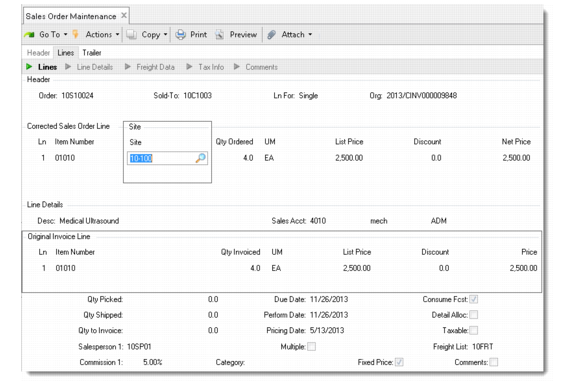
When you click Next, the data from the original invoice is copied into the correction sales order. You can make corrections to the invoice details and the trailer amounts. To correct data in the invoice details, you must select the original line in the sales order detail frame. After this, the original line is displayed and the correction line can be updated.
Sales Order Maintenance, Corrected Sales Order Line
The quantity, list price, discount, lot/serial number, site, and location can all be corrected by entering the correct values in the corresponding fields. In the background, the system calculates the differences between the original invoice and the corrections.
In the trailer of the sales order, the original values of the posted invoice are displayed as well. You must enter the difference between the original amounts and the corrected amounts. For example, if the freight charge in the original invoice is 150 and it should have been 155, then you enter a value of 5 here.