Setting Up Container Charges
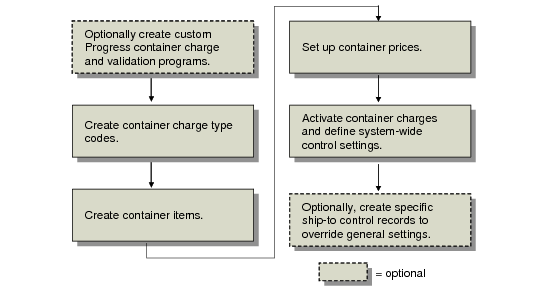
Setting up the container charge functions involves the following tasks:
• Design and code custom Progress container charge and validation programs.
• Create container charge type codes.
• Create container items and associate them with optional container groups.
• Set up container prices.
• Activate container charges in the control program and define general control settings.
• Create control records for specific ship-to addresses to override general container charge settings.
Container Charges Setup Workflow shows a typical container charge setup workflow. Some environments do not require every setup step. For example, in some environments the control program settings apply throughout the system to all ship-to addresses and containers. In other environments, control program settings need to be changed for specific combinations of ship-to address and container. In these environments, additional setup steps are required to create ship-to control records to override the control program container charge settings.
Container Charges Setup Workflow
Create Container Charge Type Codes
Charge type codes are used when applying a line charge or container charge to manage and calculate the line and container charge amounts. Each code consists of a unique name, a short description, an indicator specifying whether it is used for line charges or container charges, and an optional external calculation or validation program to execute.
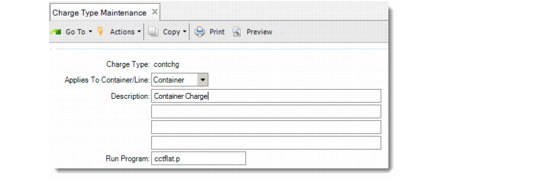
Use Charge Type Maintenance (7.22.1) to create charge type codes. Each charge type references a Progress program used to calculate the charge amount. The program calculates the charge amount before the extended price is posted on the invoice.
Since calculating a container charge amount can be a highly customized, multistep process, you can use your own custom Progress programs or either of two system-supplied charge type calculation programs to calculate the extended container charges.
When the shipper is confirmed, the container base price and charge type is retrieved from the container price table. Container prices are defined in Ship-To/Container Charge Maintenance (7.22.5) for combinations of ship-to addresses and container items. If a price list has not been defined, the price in the item master is used.
The Progress program associated with the charge type is used to calculate the extended price of the container. The two system-supplied charge type calculation programs are:
• cctflat.p calculates the container flat charge by multiplying the container price by the number of containers.
Charge = Container Price * No. of Containers
• cctunit.p calculates the container unit charge by multiplying the number of items in a container by the container price. This amount is then multiplied by the number of containers.
Charge = (Items in Container * Container Price) * No. of Containers
You can use these two system-supplied programs as models for building your own calculation programs. All your custom programs must be compiled and placed in the appropriate two-character directory where your code is located. For example, the custom program linesort.p goes in the us\li directory. The custom program contsort.p goes in the us\co directory.
See the installation guide for your system for the location of code.
Example: The cctunit.p program is specified in the Run Program field. As input, it receives a price from the price list defined in Ship-To/Container Charge Maintenance (7.22.5). It takes the number of items placed in the container and calculates the extended price as the number of item multiplied by the price on the price list.
Charge Type Maintenance (7.22.1)
Charge Type
Enter an eight-character code identifying a charge type. Some examples of charge types are FlatFee, PerUnit, and Fragile.
Applies To Container/Line
Enter Container to indicate the charge type applies to containers.
After you define the charge type as a container, it must always be applied that way. For example, you cannot apply a container charge type to a line item or a line charge type to a container.
Description
Enter a brief description of the container charge type.
Run Program
Enter the name of the Progress program used to calculate the extended price for containers that reference the charge type. If you have not created your own programs, enter
either of the two system-supplied programs. See here.Create Container Items
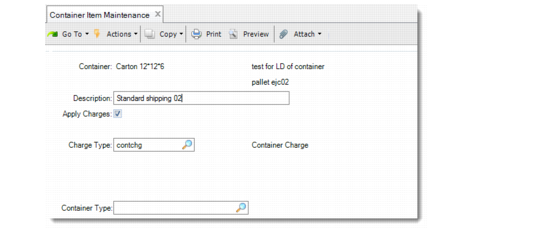
If a container item is not already in the system, you must first create it in Item Master Maintenance (1.4.1). Once the item is defined, you can associate container information with it using Container Item Maintenance (7.22.10). Container information is saved in the container item detail table (ptc_det).
Container information is used only when the container item is associated with an order line using the container charge functions. If a container item is placed on an order as an item, the container information is disregarded and the information in the item master is used instead.
You can optionally group container items by container type. The field is not validated. Container type displays on reports and inquiries.
Note: When you use Item Master Copy (1.4.12) to create a new item, only data from the item master is copied. If the source item has also been defined as a container item, container item detail is not copied. You must re-enter container information for items created by copying container items.
Container Item Maintenance (7.22.10)
Container
Enter the item previously defined in Item Master Maintenance (1.4.1) to define as a container item.
Description
Optionally enter a description (up to 24 alphanumeric characters) for this container item.
The container description prints before the item description on various reports and inquires.
Apply Charges
This field indicates whether charges should be applied when the container is used.
No: Charges are not applied when the container is used.
Yes: The charge type is applied to all order lines using this container.
Set Apply Charges to No for container items that are invoiced without a charge amount. This might include returnable containers not requiring a deposit or nonreturnable containers when the container cost is included in the product’s price.
Charge Type
Enter the charge type to use to calculate the charge amount for the container. Use Charge Type Maintenance (7.22.1) to create charge types.
When Apply Charges is Yes, you must specify a value. When Apply Charges is No, entering a charge type has no effect.
Container Type
Optionally enter a user-defined type code (up to 16 alphanumeric characters) associated with this container. Codes are not validated. They display on some reports and inquiries.
Set Up Container Charge Amounts
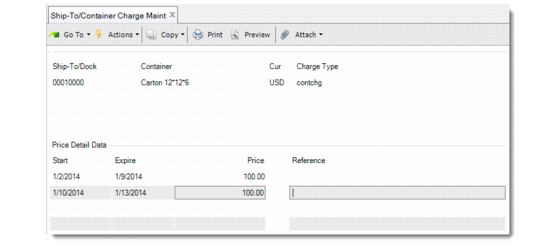
Use Ship-To/Container Charge Maintenance (7.22.5) to create records defining the amount charged for specific container items or specific container items used at specific ship-to addresses. You can set up these records in different currencies and with different charge amounts based on one or multiple date ranges. Typically, the charge amount is per container.
Each record is defined by a combination of ship-to, container, and currency:
• Define records with a blank ship-to address to indicate that the charge amount applies to the specified container regardless of where it is shipped.
• Define records with a ship-to address to indicate that the charge amount applies to the container only when used for shipments to that address.
The charge type you specify in this program overrides the charge type associated with the container item in Container Item Maintenance (7.22.10).
Each record has an associated pricing schedule, defined in the Price Detail Data frame. The schedule indicates the charge amount based on a date range specified in the Start and Expire date fields. To delete a date range, press Delete in the Price or Reference field.
When a container charge applies to an order line, the system searches for a charge amount for the ship-to and container item using the document currency and current date. An extended price calculation program associated with the charge type uses the charge amount to calculate the extended price.
A pricing schedule is useful when charge amounts change according to predefined seasonal time periods or other time-related factors. If you apply a charge during a period not covered on the schedule, the system uses the item master price for the container item to calculate the extended price.
Use these steps to set up a charge schedule:
1 Optionally enter a ship-to address on the header.
2 Enter the container, currency, and charge type.
3 Enter the start and expire date for the date range. Use the mm/dd/yy format; for example, October 19, 2002, is noted as 10/19/02.
4 Enter the price for the date range. You can optionally enter reference data.
Warning When entering multiple date ranges, make sure they do not overlap.
Example: The price for item 003 is $4.25 in Item Master Maintenance (1.4.1). The container price you typically charge for this item is $4.50. For production year 2002, the price will fluctuate as follows: $4.75 in June, $5.00 in July, $5.25 in August, and $4.25 in October. Enter the date ranges for this requirement as shown in
Sample Date Ranges in mm/dd/yy Format:
Sample Date Ranges in
mm/dd/yy Format
Start | Expire | Price |
01/01/02 | 05/31/07 | 4.50 |
06/01/02 | 06/30/07 | 4.75 |
07/01/02 | 07/31/07 | 5.00 |
08/01/02 | 08/31/07 | 5.25 |
09/01/02 | 09/31/07 | 4.75 |
11/01/02 | 12/31/07 | 4.50 |
Note: Since a date range is not indicated for October, the price defined in Item Master Maintenance is used that month.
Ship-To/Container Charge Maintenance (7.22.5)
Ship-To/Dock
Optionally enter the ship-to or dock address to use as part of the ship-to/container record. Leave this field blank if you want the price details to apply to all ship-to addresses without associated ship-to/container records.
Container
Enter the container item to use as part of the ship-to/container record. You must specify an item previously defined in Container Item Maintenance (7.22.10). This field is required.
The price details apply to the specified container only. When both a ship-to and container are specified, the price details apply to the container only when shipped to the specified ship-to.
Cur
Enter the currency of the price schedule. Currency codes identify monetary units and form the basis of exchange rate relationships.
The base currency of the domain displays by default. When container charges are added to sales orders and scheduled orders, the system searches for prices using the order currency.
Charge Type
Enter a container charge type to associate with this record. The value of Applies To Container/Line in Charge Type Maintenance (7.22.1) must be set to Container for the charge type specified.
If Apply Charges is No for the charge type, it can be used as a reporting identifier.
Start
Enter the first date (in mm/dd/yy format) when this record should be considered active.
Expire
Enter the last date (in mm/dd/yy format) when this record should be considered active.
Price
Enter the container price for the associated date range. Price is expressed in the currency specified in the Currency field.
During the date range, the amount specified in Price is used by the program associated with the charge type to find the extended container price. If Apply Charges is No for the charge type, the prices are not applied.
Price defaults from the item master (pt_mstr) record.
Reference
Optionally enter a reference (up to 30 alphanumeric characters) for the active date range and price amounts. For example, enter a purchase order number or any general comment indicating why the price was set for the associated date range.
This value can display on various reports.
Set Up System-Wide Default Container Information
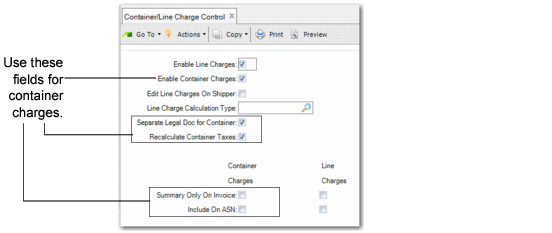
Use Container/Line Charge Control (7.22.24) to activate container charge functions.
Note: Container charge and line charge functions can be used separately or together.
The values you define here default to corresponding fields in Ship-To Control Maintenance (7.22.15). Use that program to change this value for specific combinations of ship-from sites and ship-to addresses
Container/Line Charge Control (7.22.24)
Use the following descriptions to enter values for the container-related fields:
Enable Container Charges
Enter Yes to activate the container charge functions.
For a list of program changes that take place when you enable container charges, refer to Container Charges. See
here.
Separate Legal Doc for Container
Select this field to generate a separate legal document for the containers.You can also set this field at customer level in Ship-To Control Maintenance.
Recalculate Container Taxes
Select this field to treat the container as an unplanned issue.
This field indicates that you are using a different GTM base for the container and tax is determined according to the container lines on the shipper. It is not accounted for in AR or displayed on the customer invoice.
Summary Only on Invoice: Container Charges
Indicate how container charges display on invoices.
No. Container charge details print at the end of the invoice, including the container item number, the quantity of container items used, the price per container item, and the total charges. The charge amounts are subtotaled and display in the Container trailer field. This subtotal is included in the invoice total.
Yes: Container charge details do not print on the invoice. Container charge amounts are subtotaled and display in the Container trailer field. This subtotal is included in the invoice total.
Include on ASN: Container Charge
Indicate whether to include the container charge and description on the ASN.
No: The container charge information is not sent.
Yes: A detail line for each container charge is sent on the ASN. Currently, the ASN does not include pricing information.
Create Control Program Exceptions
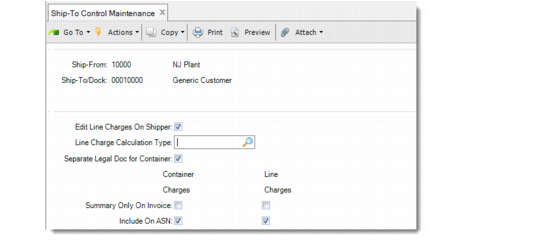
Use Ship-To Control Maintenance (7.22.15) to create control records that override the settings in Container/Line Charges Control for specified ship-from and ship-to combinations.
Most of the field values in this program default from corresponding fields in the control program. The field descriptions in the control program also apply to the fields in this program.
Note: The settings in this program only apply to the specific ship-from/ship-to combination specified in the header frame.
Ship-To Control Maintenance (7.22.15)