Setting Up Line Charges
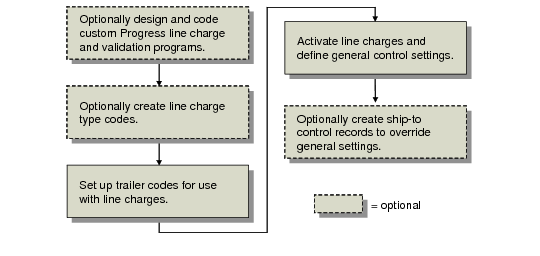
Setting up the line charge functions is very similar to setting up the container charge functions. It involves the following tasks:
• Design and code custom Progress line charge and validation programs.
• Optionally create line charge type codes.
• Set up trailer codes for use with line charges.
• Activate line charges in the control program and define domain-wide control settings.
• Optionally, create ship-to control records to override control program line charge settings.
Line Charges Setup Workflow shows a typical line charge setup workflow. Some environments do not require every setup step. For example, in some environments the control program settings apply throughout the system to all ship-to addresses. In other environments, control program settings need to be changed for specific ship-to addresses. In these environments, additional setup steps are required to create ship-to control records to override the control program line charge settings.
Line Charges Setup Workflow
Create Line Charge Type Codes
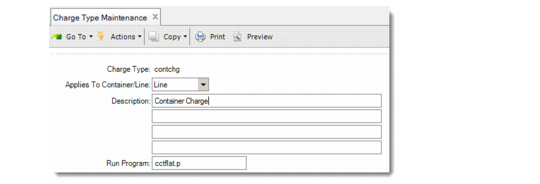
Charge type codes can be used when applying a line charge as well as a container charge. However, while charge types are required with container charges, they are optional with line charges. If you decide to implement them, use Charge Type Maintenance (7.22.1) to create charge type codes for line charges.
Specify Line for Applies To Container/Line to indicate that the charge type is used for line charges.
Charge Type Maintenance (7.22.1)
Line charges can be calculated similarly to container charges by associating a Progress program with the line charge type to calculate the extended charge amount. Unlike container charges, you cannot define price lists for line charge. Line charge amounts are specified at the line level when the charge is applied.
When you apply a line charge, a trailer code must be entered, but a charge type is optional. As with container charges, the charge type can reference an external calculation or validation program. The trailer code is used to manage GL and tax details for the charge.
Set Up Trailer Codes for Line Charges
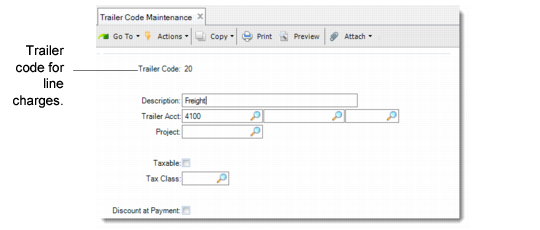
An additional line charge is a special kind of trailer code that applies to a line rather than to an entire order. Use Trailer Code Maintenance (2.19.13) to create trailer codes for your line charges.
Trailer Code Maintenance (2.19.13)
The trailer code details let you specify a GL account for reporting line charge amounts and let you indicate if the charge is taxable.
Set Up Default Line Charge Information
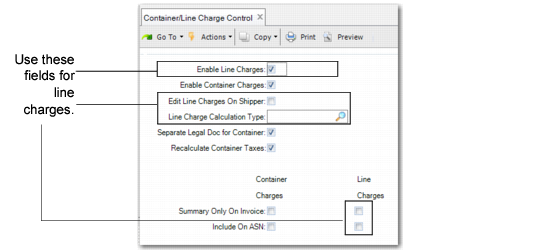
Use Container/Line Charge Control (7.22.24) to activate line charge functions in the current domain.
Note: Container charge and line charge functions can be used separately or together.
The values you define here default to corresponding fields in Ship-To Control Maintenance (7.22.15). Use that program to change this value for specific combinations of ship-from sites and ship-to addresses.
Container/Line Charge Control (7.22.24)
Use the following descriptions to enter values for the fields in the first frame:
Enable Line Charges
Enter Yes to activate the line charge functions of the Container and Line Charges module.
When set to Yes, you can associate up to 999 additional line charges with a line item on a sales order or shipper.
When the system applies line charges to an order, you can specify charge type and charge amount (charge type is optional). The extended charge can be calculated using the charge type. Line charges associated with sales orders can be defined as one time only or recurring. Line charges on shippers are always one time only.
For a list of program changes that take place when you enable line charges is included in the overview.
Edit Line Charges on Shipper
Indicate whether line charges can be modified on shippers:
No: Only the line charges from the sales order apply to the shipper. Deleting or modifying existing line charges or adding new line charges is allowed only in Sales Order Maintenance (7.1.1), Pending Invoice Maintenance (7.13.1), Customer Scheduled Order Maintenance (7.3.13), and Order Line Charge Maintenance (7.22.13).
Yes: The line charges from the sales order are added to the shipper. You can delete, modify, and add new line charges when building the shipper.
When this field is Yes, the Additional Line Charges frame displays in the following programs:
• Container Workbench (7.7.1)
• SO Container Maintenance (7.7.5)
• Pre-Shipper/Shipper Workbench (7.9.2)
• Sales Order Shipper Maintenance (7.9.8)
Line Charge Calculation Type
Enter the default charge type to use to calculate the charge amount applied to new line charges added to sales orders or shippers. See
Create Line Charge Type Codes.
Summary Only on Invoice: Line Charges
Indicate how additional line charges display on invoices:
No: Line charge details print on the invoice, including the charge description, the charge amount, whether the amount is taxable, and the extended price. Line charge amounts are subtotaled and display in the Line Charges trailer field. This subtotal is included in the invoice total.
Yes: Line charge details do not print on the invoice. Line charge amounts are subtotaled and displayed in the Line Charges trailer field. This subtotal is included in the invoice total.
Include on ASN: Line Charge
Indicate whether to include additional line charge data on the ASN. Each additional line charge displays as a new ASN line.
No: The additional line charge information is not sent.
Yes: A detail line for each additional line charge is sent on the ASN. Currently, the ASN does not include pricing information.
Create Line Charge Control Exceptions
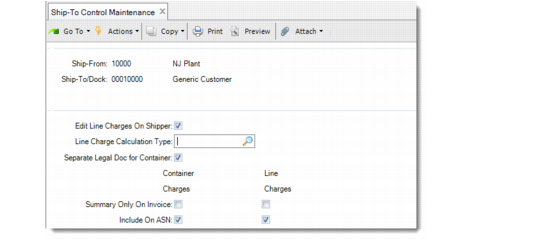
Use Ship-To Control Maintenance (7.22.15) to create control records that override the settings in Container/Line Charges Control for specified ship-from and ship-to combinations.
Field values in this program default from corresponding fields in the control program. The field descriptions in the control program also apply to the fields in this program.
Note: The settings in this program only apply to the specific ship-from/ship-to combination specified in the header frame.
Ship-To Control Maintenance (7.22.15)