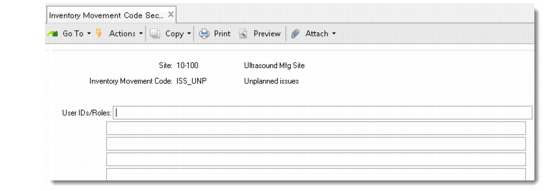
Assign Inventory Movement Code Security
You can restrict which inventory movement codes can be used at a site and who can use them. Use Inventory Movement Code Security (36.3.13.13) to grant or deny access to individuals and roles when using a specific inventory movement code at a particular site. Use Inventory Movement Code Security Browse (36.3.13.14) to search for and display information relative to existing inventory movement code security.
When a shipper is created, the system checks inventory movement code security records to determine which inventory movement codes are available, based on the Ship-From site of the shipper. These records also determine who can confirm or update an existing shipper.
See the chapter on security in
QAD Security and Controls User Guide for details.
Note: This level of security does not affect whether a line item from a given sales order or other originating transaction can be added to a shipper.
Inventory Movement Code Security (36.3.13.13)
Assign or modify access rights to users/roles by entering the appropriate data in the following fields:
Site
This field is used with the Inventory Movement Code field to determine whether a given user (defined in the User/IDs/Roles field) has access to the specified inventory movement code at the site entered. Enter an existing site code.
Inventory Movement Code
Enter a valid inventory movement code to be secured at the defined site. This code is used in combination with the Site field to determine whether a given user or role has access to the inventory movement at the site.
User IDs/Roles
Specify the users or roles who are granted or denied access. Roles are associated with users in Role Permissions Maintain (36.3.6.5).