QAD 2017 Enterprise Edition
>
User Guides
>
Sales
>
Shipping
>
Setting Up Shipping
Setting Up Shipping
Shipping has a broad focus that enables you to produce and record sales order shipping documents that comply with diverse regional requirements and common business practices on a global scale. A flexible, user-configured set of related shipping features can be used to facilitate international shipments and control how documents are produced.
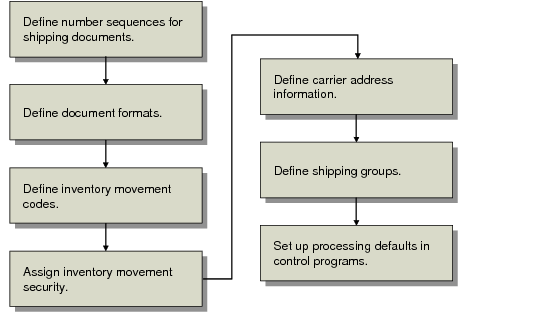
The setup steps shown in
Shipping Setup Workflow and described in the following topics also apply to DO shipper setup.
The workflow for setting up all shipping features is shown in
Shipping Setup Workflow.
Shipping Setup Workflow
Each organization must determine how many features they need to implement to meet their own shipping needs. Consider requirements such as:
• Local and regulatory requirements governing document numbering
• Local and regulatory requirements governing inventory movement
• Company-specific information
• Industry or company-specific business practices
If your shipping needs are simple, only two setup steps are required:
• Set up numbering sequences for shipper documents (see
here).
• Set up Container/Shipper Control (see
here) and Cust Sched/Shipper Acct Control.
Important: If you use shippers and pre-shippers, Number Range Management is required.
Each of the steps in the workflow is described in detail in the following sections.