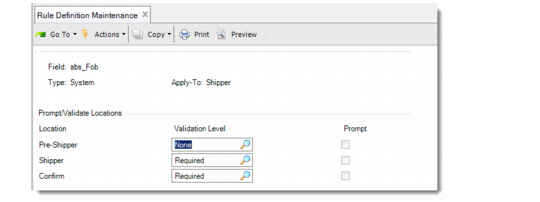
Determining Validation/Prompt Locations
Once you add the field details, use the Prompt/Validate Locations frame to specify the location at which the system:
• Validates the field
• Prompts for user entry
Prompt/Validate Locations Frame
Validation Level
Indicate the validation level for a pre-shipper, shipper, or shipper confirmation:
None: The field is not validated.
Required: The field is required. If users do not enter data or enter incorrect data, the system displays the message specified in the Validate Message field as an error. Additional messages may display, too.
Optional: The field is optional. If users do not enter data or enter incorrect data, the system displays the message specified in the Validate Message field as a warning. Additional messages may display, too.
Prompt
Indicate whether you want the system to prompt for field values in the pre-shipper, shipper, or shipper confirmation. This field is display only if you are creating validations for a system field.
No (the default): The system does not prompt for values.
Yes: The system prompts for values.
Note: This field is display only if you are adding a system field.