QAD 2017 Enterprise Edition
>
User Guides
>
Sales
>
Shipping
>
Setting Up Shipper Validation
Setting Up Shipper Validation
Use the following programs in the Shipper Validation Menu (7.9.11) to verify that pre-shippers/shippers are compliant with customer specifications before sending them:
• Rule Definition Maintenance (7.9.11.1)
• Source/Destination Rule Link (7.9.11.5)
When compliance problems occur, the system displays errors during shipper processing. Also, the system does not confirm shippers with errors. By notifying you of incomplete or erroneous data in shipper programs, you can correct problems before the shipper is processed. This means the shipper is correct before you send a hardcopy, or if you use ASNs and EDI, before you send the shipper through EDI. You can also add and validate shipper fields that are required for purposes other than EDI eCommerce.
To process with validations, see
here.
This section describes tasks you complete before you can begin validating shipper fields during shipper processing.
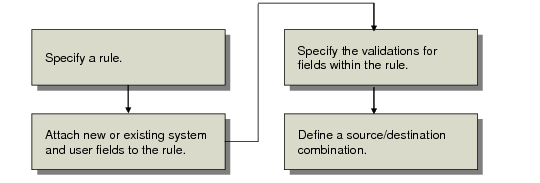
Setup Flow depicts the tasks.
Setup Flow
You complete all setup tasks, except defining a source/destination combination, in Rule Definition Maintenance (7.9.11.1). You define a source/destination combination in Source/Destination Rule Link (7.9.11.5).