Creating and Entering Line-Item Categories
You can optionally assign categories to line items on sales and distribution orders. This feature is available to all users. When you use the Shipment Performance module, the line-item category is included in the performance transaction record and can have special significance for performance reporting.
Use categories to group similar line items and support detailed shipment performance reporting. Create categories in Generalized Codes Maintenance (36.2.13) for field name line_category. You can define any number of categories to describe an order line, such as:
• Rush
• Emergency
• Special stock
• Regular stock
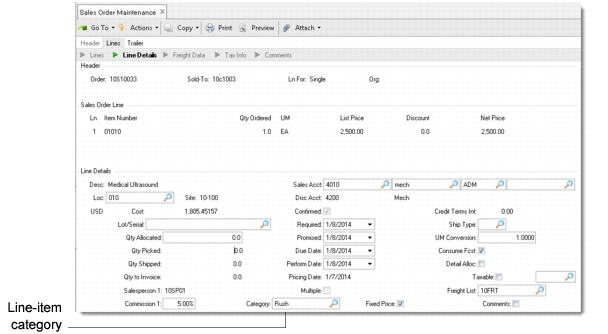
Enter a category at the line-item level in the following programs:
• Sales Order Maintenance (7.1.1)
• Pending Invoice Maintenance (7.13.1)
• Customer Scheduled Order Maintenance (7.3.13)
• Material Order Maintenance (10.7.1)
• RMA Maintenance (11.7.1.1)
• Material Order Maintenance (11.11.1)
• Distribution Workbench Maintenance (12.17.13)
• Distribution Order Maintenance (12.17.14)
Sales Order Maintenance (7.1.1), Line-Item Category Field
When a performance transaction record is created for an order line item, the category becomes part of the transaction record. You can analyze shipment performance data based on line-item categories using the following reports:
• Missing Reason Code Report (7.9.17.10)
• Shipment Performance Report (7.9.17.15)
• Reason Code Analysis Report (7.9.17.17)
• Item Analysis Report (7.9.17.18)
• Customer Analysis Report (7.9.17.19)
Use Shipment Performance Data Maintenance (7.9.17.13) to modify line-item categories for performance transaction records.