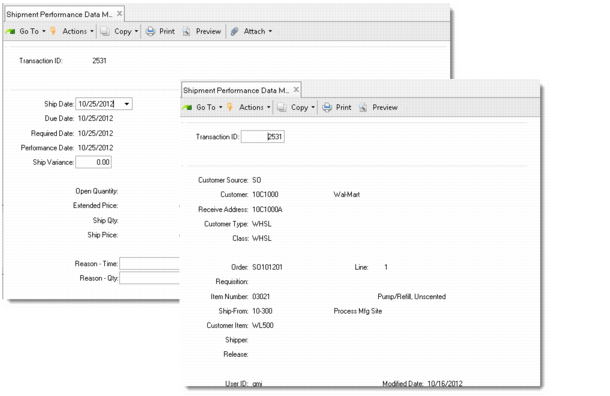
Modifying Performance Transaction Records
Use Shipment Performance Data Maintenance (7.9.17.13) to modify performance data and add comments to any performance transaction record. You cannot use this program to delete existing records or to create new ones.
Shipment Performance Data Maintenance (7.9.17.13)
Most of the fields in this program display data that cannot be modified. This section discusses only the fields you can update.
Note: When you change values, the system does not recalculate and assign new status codes for a shipment. You must manually update related fields that should also change.
Transaction ID
Enter the transaction ID of the performance transaction record to modify. Transaction IDs are assigned by the system when a record is initially generated. Optionally use next/previous to find the transaction ID to modify.
Performance transaction records are created by the system in numerical order, ranging from 00000000 to 99999999. When the last record is created, the system recycles unused transaction numbers beginning with the first available record number. You can archive or delete transaction records.
Ship Date
The system displays the date the shipment was made. You can optionally modify the ship date.
Ship Time
The system displays the time the shipment was made. You can optionally modify the ship time.
Schedule Time
The system displays the scheduled time associated with the schedule requirement shipped against. This is used only for scheduled or sequence scheduled orders.
You can optionally modify the schedule time for most shipments.
Due, Required, and Performance Date
The system displays the due, required, and performance dates for this shipment.
Ship Variance
The system displays the percentage that the actual ship quantity was over or under the open quantity. This number is calculated by comparing the shipment quantity to the open quantity at the time the shipment was processed. You can optionally change the ship variance percentage.
Status
The system displays the status codes assigned to this shipment based on comparisons between the ship date and the due date, required date, performance date, or ship variance. You can optionally change the status code. This change affects this shipment record only.
Acceptable
This value indicates whether the assigned status code was defined with Acceptable set to Yes or No. You can change the value of this field.
Status codes are defined as acceptable or unacceptable in Quantity-Based Status Code Maintenance (7.9.17.6) or Time-Based Status Code Maintenance (7.9.17.4).
Reason – Time
The system displays any reason code related to the timeliness of the shipment.
This field is validated against values defined in Reason Code Maintenance for a reason type of shiptime.
Category
The system displays the category assigned to the order line.
You can optionally delete or change order-line category. This field is validated against values defined in Generalized Codes Maintenance for field name line_category.
Reason – Qty
The system displays the reason code related to the completeness of the shipment.
This field is validated against values defined in Reason Code Maintenance for a reason type of shipqty.
Include in Reporting
Enter No to exclude this record from shipment performance reports. Otherwise, leave the default Yes.
When Yes, this information is included by the following Shipment Performance reports:
• Shipment Performance Report (7.9.17.15)
• Reason Code Analysis Report (7.9.17.17)
• Item Analysis Report (7.9.17.18)
• Customer Analysis Report (7.9.17.19)