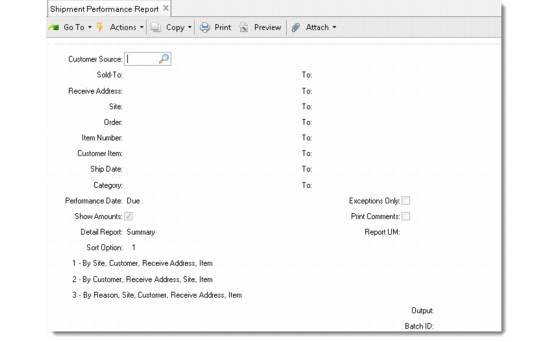
Shipment Performance Report
The Shipment Performance Report (7.9.17.15) displays the overall shipping performance by time-based status code. It calculates and displays item totals for each unit of measure and currency combination. Depending on sort option, it shows totals for items, customers, sites, and reason codes by time-based status code.
Shipment Performance Report (7.9.17.15)
Performance Date
Enter Due, Required, or Performance to indicate the performance transaction records to display based on the date used to calculate the associated status codes.
The due, required, or performance date is displayed on the report as the Perf Date.
Note: You cannot enter performance date in every program analyzed on this report. When this is the case, due date is used as the performance date, regardless of which date type is entered.
This field defaults from Shipment Performance Control.
Exceptions Only
Enter either No or Yes.
No: The report displays all shipments, including early, late, undershipped, and overshipped shipments.
Yes: The report displays only performance transaction records with exception status codes. These status codes have Acceptable set to No. All other records are omitted.
Show Amounts
Enter Yes to show all currency totals; otherwise, leave the default No. This option lets you produce reports with zero currency amounts, allowing for greater confidentiality of your finances.
Print Comments
Specify whether to include reason and status code comments associated with each performance transaction record. Comments are printed only when the report is run in detail mode.
Detail Report
Enter Detail to generate a detailed report; otherwise, leave the default Summary to produce a summary report.
The summary report shows the item, customer, and site totals, as well as the currency total, quantity, and unit of measure.
The detail report shows the summary totals as well as details for all associated transaction records.
Report UM
Enter a valid unit of measure defined in Unit of Measure Maintenance (1.13). The system uses this unit of measure for item totals at the customer and site levels.
A report UM is needed when the quantities represented by various shipments are expressed in more than one unit of measure. The system converts these quantities to the common unit of measure you specify so that totals can be compared meaningfully.
For this conversion to work correctly, a conversion factor must be defined between each shipment unit of measure and the report unit of measure in Unit of Measure Maintenance.