Defining Control Program Settings
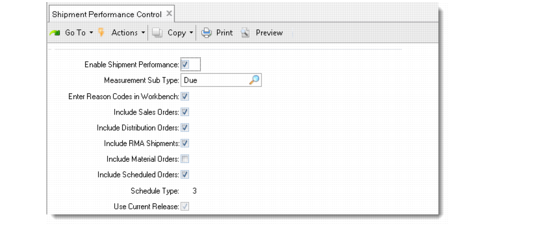
Use Shipment Performance Control (7.9.17.24) to activate this module and to create generic shipment performance default settings for the current domain. These generic defaults should reflect the information you compiled in the planning stage. They represent the typical way your business environment operates.
Note: Once this module is activated, the system creates performance transaction records for all shipments matching control records, even when applicable status codes are not found. See
Establishing Performance with Status Codes.
Most of the values you define in the control program default to Performance Controls Maintenance (7.9.17.1). In that program, you can override control program settings for specific combinations of customer source, receive address, ship-from, and item number.
Shipment Performance Control (7.9.17.24)
After you activate Shipment Performance, enter appropriate values for the following control program settings:
Measurement Sub Type
Indicate whether the due, required, or performance date should be the default date for the Performance Date field in the following shipment performance reports:
• Missing Reason Code Report (7.9.17.10)
• Shipment Performance Report (7.9.17.15)
• Reason Code Analysis Report (7.9.17.17)
• Item Analysis Report (7.9.17.18)
• Customer Analysis Report (7.9.17.19)
Measurement Sub Types are predefined in Language Detail Maintenance (36.4.2). They do not need to be set up before using the Shipment Performance module.
You cannot specify the performance date in every program that Shipment Performance analyzes:
• You can specify the due date, required date, and performance date in Sales Order Maintenance (7.1.1) and RMA Maintenance (11.7.1.1).
• You can specify due date or required date in Material Order Maintenance (10.7.1 or 11.11.1).
• You can specify due date only in Distribution Order Maintenance (12.17.3).
When performance date is not available, Shipment Performance uses the due date as the performance date, regardless of which date you enter here.
Enter Reason Codes in Workbench
You create shipment performance reason codes in Reason Code Maintenance (36.2.17). You can define reason codes with shiptime as the reason type for time-related reason codes and shipqty as the reason type for quantity-based reason codes. Reason codes are stored in the shipment history. See
Creating and Entering Reason Codes.
When you set the value of this field to Yes, a data collection frame displays in Pre-Shipper/Shipper Workbench during maintenance of a shipper, letting users enter reason codes. Otherwise, you can use two other programs to enter codes:
• Use Shipment Reason Code Entry (7.9.17.9) to quickly enter reason codes for performance transactions that do not have assigned reason codes.
• Use Shipment Performance Data Maintenance (7.9.17.13) to enter reason codes for records that have at least one assigned reason code or if you are authorized, to change previously assigned reason codes.
Select the type of orders to monitor by entering Yes or No for sales orders, distribution orders, RMA shipments, material orders, and customer scheduled orders. The settings you indicate here should reflect the most common needs across your system.
If you choose to monitor scheduled orders, enter values for the next two fields.
Schedule Type
Enter the schedule type used to calculate shipment performance for scheduled orders:
1: Planning schedule
2: Shipping schedule
3: Required ship schedule (the default value)
To assign status codes for shipment performance, the system compares the actual ship date and quantity to the ship date and quantity on the indicated schedule.
Use Current Release
Indicate Yes to use the current schedule release or No to use the prior schedule release to measure shipment performance when shipping against scheduled orders. Typically, you select a prior schedule when you are in an environment that packs orders a day ahead of the actual shipment.