Item Analysis Report
The Item Analysis Report (7.9.17.18) displays the items from shipments with exception status codes. You can run this report in detail or summary mode:
• Summary mode displays the total shipments of each item and the number of shipments with exception status codes.
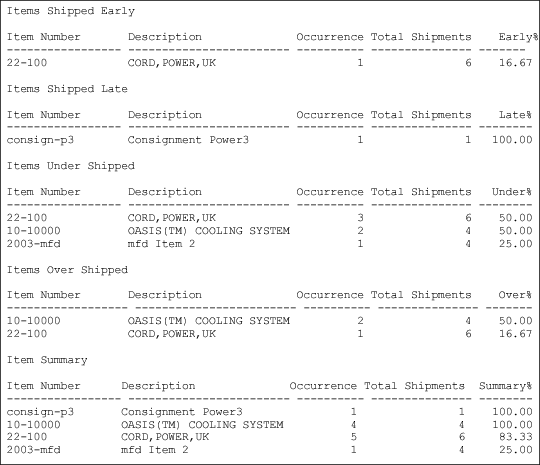
Item Analysis Summary Report Layout illustrates a summary report.
• Detail mode shows detailed shipment information, including the receive address, transaction ID, and applicable dates.
Item Analysis Report (7.9.17.18)
The total shipments and the number of shipments with exception status codes are compared to calculate an unacceptable percentage for each item. Item information on each section of the report is displayed from the highest to the lowest occurrence percentage. As shown in
Item Analysis Summary Report Layout, the Item Summary section of the report displays the percentage in the Summary% column.
If information for a particular section of the report is not available, that section does not display. Data for all sections of the report displayed in
Item Analysis Summary Report Layout were available.
Additionally, the percentage in the Summary% section can exceed 100% if multiple status codes are assigned to a shipment. For example, a shipment that is undershipped and shipped late has two status codes assigned. If this is the only shipment of that item, then the report shows two occurrences for that shipment. Summary% for the shipment displays 200.
Item Analysis Summary Report Layout