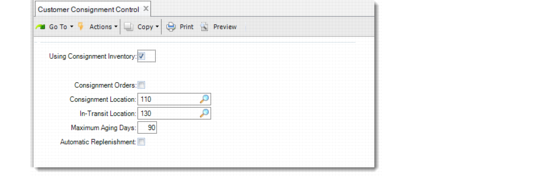
Activate Customer Consignment and Configure Control Settings
Use Customer Consignment Control (7.18.24) to activate the Customer Consignment Inventory module. All values default to Ship-To/Item Controls Maintenance (7.18.1), where you can modify them for specific combinations of ship-to addresses and items.
Customer Consignment Control (7.18.24)
Using Consignment Inventory
Use this field to activate the Customer Consignment Inventory module. The default is No.
No: Standard sales order programs display. The system bypasses all consignment screens.
Yes: The Customer Consignment Inventory module is active. You can use Customer Consignment Inventory programs.
Once you have activated the module, created consigned items, or performed transactions, entering No to deactivate the module displays a warning message. Unless all consigned items are consumed, the system warns you that non-invoiced consigned items exist and prompts you to confirm your action.
Consignment Orders
Specify the default value for the Consignment Orders field in the header of new sales and scheduled orders:
No: Enter No if the majority of shipments are standard sales orders.
Yes: The Consignment Orders field on the header of all new sales orders and scheduled orders is Yes. This, is turn, sets the Consignment field on the order line to Yes by default.
In either case, you can combine lines for both consigned and non-consigned inventory on one order.
The value defined here is used on new orders only if the system does not find a more specific match in Ship-To/Item Controls Maintenance.
Consignment Location
Enter the location representing consigned inventory that resides at a customer facility.
In-Transit Location
Optionally enter the location that represents consigned inventory that is in-transit between you and your customer.
When you enter a value for a consigned location but not for an in‑transit location, inventory ready for shipping is transferred from the inventory location directly to the location representing the customer facility.
When you enter an in-transit value, inventory is transferred from the inventory stocking location to the in-transit location. Enter only valid locations set up in Location Maintenance (1.1.18).
Important: Assign in-transit and consignment locations an inventory status code with Nettable set to No. Otherwise, MRP considers items in these locations as available to net against open requirements. This understates real demand. Do not use locations defined for customer reserved inventory since this may prevent shipping from occurring.
Maximum Aging Days
Enter the maximum number of days consigned inventory is allowed to be in-transit to a customer facility or remain there after shipment.
The default value is 0 (zero), which indicates there is no scheduled aging deadline.
Automatic Replenishment
Indicate whether a planned replacement line is automatically added to the active required ship schedule based on the last quantity consumed. This option is for customer scheduled orders only.
No: A replenishment line is not added to the required ship schedule. New schedules are determined by using Required Ship Schedule Update (7.5.3).
Yes: A replenishment order is automatically generated when items are consumed. The replenishment line is added to the next open date on the schedule for a quantity matching the quantity consumed.