Managing Aged Inventory
In the Customer Consignment Inventory module, you can track inventory by ship date or by how long it has been in a consignment location. By assigning maximum aging days to the sales order line, you can:
• Identify inventory that exceeds the set number of days without being consumed.
• Extend the aging date on individual or multiple orders.
• Consume oldest shipments first.
• Consume shipments by sequence number, authorization, cross- reference, or lot/serial number.
When the consigned inventory has not been consumed by the customer and has not been returned, ownership can be transferred to the customer. The transfer of ownership does not occur automatically, however, allowing the supplier and customer to negotiate a compromise.
Note: The aging date is separate from the expiration date.
To determine the date that maximum aging occurs, the system uses the following calculation:
shipment date + transit time + maximum aging days = maximum aging date
• Shipment date is the date of shipping transactions created in Sales Order Shipments (7.9.15) or Pre-Shipper/Shipper Confirm (7.9.5).
• Maximum aging days is taken from the consignment sales order line data (7.1.1).
The calculated maximum aging date for each shipment is shown in various aging reports.
Identifying Aged Inventory
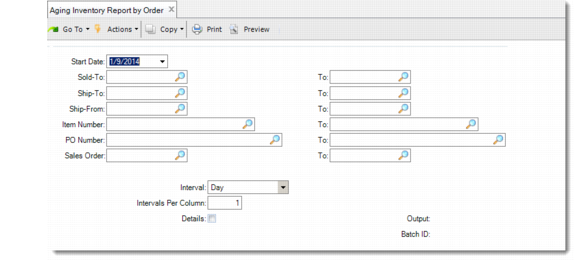
Use Aging Inventory Report by Order (7.18.4.7) to determine how long unused inventory on specific orders has been consigned. You can make daily, weekly, or monthly determinations for six financial periods; for example, six calendar weeks.
Aging Inventory Report by Order (7.18.4.7)
Use Aging Inventory Report by Part (7.18.4.8) to identify consigned inventory by item number.
Use Aging Inventory by Order with Sequence (7.18.4.9) to identify consigned quantities on scheduled orders that include sequence numbers.
Extending the Aging Date
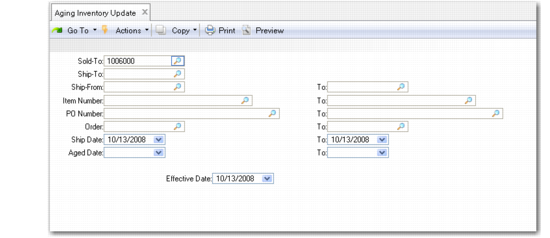
Use Aging Inventory Update (7.18.10) to extend the allowed time of consignment by setting a new aging date or adding days to the existing date. You can extend the maximum aging date as many times as required. An extension automatically updates each shipment.
You can also optionally record inventory usage with this program. In this case, the same inventory and GL transactions occur as in other usage programs.
Aging Inventory Update (7.18.10)
The values in Aging Inventory Update default from shipment data. You can update these fields in the Max Age Date frame:
Use
Enter Yes to designate this inventory as used. Entering Yes generates a shipment transaction (ISS-SO). The system debits the Cost of Goods Sold (COGS) accounts and credits the Inventory account.
New Date
Enter the new maximum age date you want to assign to this inventory, unless you enter the number of days you want to add to the age date.
Days
If New Date is blank, enter the number of days you want to add to the maximum age date.The system automatically calculates the new date.
Use Aging Inventory Batch Update (7.18.11) to revise aging dates for a group of sales orders. Aging Inventory Batch Update extends aging dates only; you cannot use it to transfer ownership.