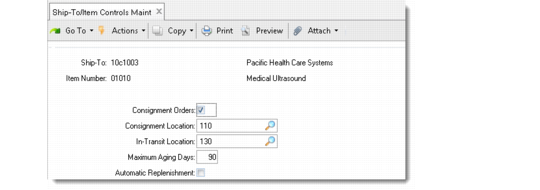
Create Control Records for Specific Ship-To/Item Combinations
Use Ship-To/Item Controls Maintenance (7.18.1) to define specific default values for combinations of ship-to addresses and item numbers. The values entered here override the settings in Customer Consignment Control. When new orders are created for a specific ship-to address, the system looks for the most specific record first to determine the defaults to use.
With the exception of Ship-To and Item Number, field values in Ship-To/Item Controls Maintenance default from corresponding fields in Customer Consignment Control (7.18.24). Field descriptions in Customer Consignment Control also apply to the fields in this program.
Ship-To/Item Controls Maintenance (7.18.1)
Ship-To
Enter the customer ship-to address that uniquely identifies this control record.
This is a required field. Associated control values apply to this ship-to only.
You must enter a valid address with a list type of customer or ship-to.
Item Number
Optionally enter an item number to use as part of the unique identifier for this control record. This item number represents the consigned item being shipped to the customer.
When you enter an item number, this control record applies to sales order lines for this item only.
Items must be previously defined in Item Master Maintenance (1.4.1).
The default is blank. When left blank, this control record applies to all items for the associated ship-to without a specific control record.