Creating the EMT Purchase Order
An important advantage of EMT is its ability to generate purchase orders from confirmed sales orders automatically.
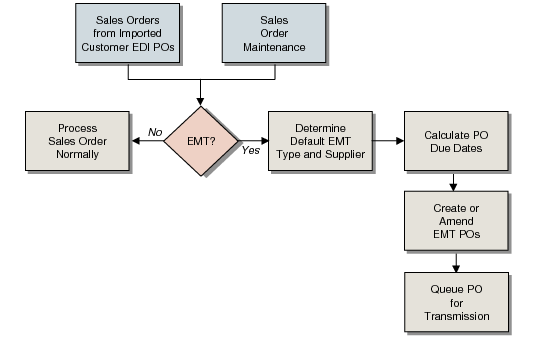
Creating an EMT Purchase Order summarizes the EMT purchase order process, which takes place automatically when you enter a confirmed sales order.
Creating an EMT Purchase Order
When a sales order is confirmed at the PBU, the system checks control program and master-table values to determine whether EMT processing is required. If it is, the system calculates the EMT due date, creates an EMT purchase order, and queues the PO for export to the appropriate SBU.
Note: When you create an EMT sales order with multiple lines and multiple suppliers, the system combines the lines into a single, multiple-line purchase order for each supplier. If multiple lines represent the same item, the PO has each line item quantity on a different line. If order lines for one supplier are on separate sales orders, the system maintains a separate purchase order for each sales order.
The system creates or maintains a sales order based on an imported EDI document. An EDI document contains PO information used to create sales orders at an SBU.
Deferring the Creation of an EMT Purchase Order
To prevent automatic EMT processing from starting immediately on sales orders, create or import the sales orders as unconfirmed.
• When you enter a sales order manually in Sales Order Maintenance (7.1.1), set Confirmed to No. You can set the default for all new sales orders in the Confirmed Orders field of Sales Order Control (7.1.24).
• When you import the end customer’s purchase order using EDI eCommerce, set Confirmed EMT SO to No for that customer in Customer Data Maintenance (2.1.1).
• To create an unconfirmed secondary sales order from the PBU’s imported purchase order, set Confirmed EMT SO to No in the PBU’s record in Customer Data Maintenance.
In either situation, if an EMT sales order is unconfirmed, EMT processing does not begin until you confirm it using Sales Order Confirmation (7.1.5). This creates the corresponding EMT purchase order and queues it for export.