QAD 2017 Enterprise Edition
>
User Guides
>
Sales
>
Configured Products
>
Defining Control Program Settings
Defining Control Program Settings
Configured Products Control (8.24) determines the kind of transactions that can be used for final assembly (FAS) orders and how final assembly orders are created for items that require serial-number control.
FAS orders can only be created for configured items that have been defined as assemble to order (ATO) in Item Master Maintenance (1.4.1). Therefore, the first three control program fields apply to ATO items only.
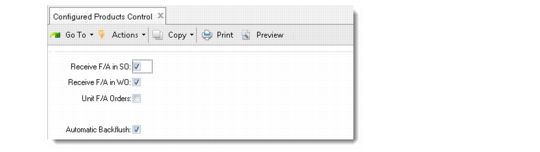
Configured Products Control (8.24)
Receive F/A in SO
Enter Yes to have sales order shipments automatically record a receipt on final assembly work orders. This does not happen for unit final assembly orders, because the system cannot know which of several orders to complete.
Receive F/A in WO
If Yes, you can receive items from FAS orders using Work Order Receipt (16.11) or Work Order Receipt Backflush (16.12), maintaining complete component traceability for serial-numbered items.
Unit F/A Orders
Set to Yes only when separate (unit) final assembly work orders, each with an order quantity of one, should be created for multiple quantity orders of a serial-controlled configured product. This option may be necessary if full lot/serial traceability is required for serialized products. These items have Lot/Serial set to S in Item Master Maintenance.
Example: A computer manufacturer has an expensive line of high-performance workstations that are serial-number controlled. The internal disk drive is also serial numbered. To ensure that the service department knows exactly which disk drive is included in each unit, each multiple-unit sales order must be broken into individual work orders.
When Unit F/A Orders is No, the system supports lot/serial traceability of components to a group of configured assemblies but not to the individual serial number.
If you are using the Service/Support Management module and track components of configured items in the installed base, this field should be set to Yes.
Note: FAS orders for non-serial-controlled items are always created with a quantity equal to the line item quantity on the sales order, regardless of how Unit F/A Orders is set.
Automatic Backflush
Determines whether the component issue transactions for configured items that are shipped without a final assembly order are created without having to enter shipment information for each sales order line. These items must be defined as kits.
If Yes, when you use Sales Order Shipments (7.9.15) or Pre-Shipper/Shipper Confirm (7.9.5) for an order with a configured item that does not have a final assembly order, a component issue pop-up displays so that you can automatically backflush components. If the default quantity is not available for each component of a configured item, you manually process that line.