Configured Products
Configured products assume their final form based on customer specifications. For these products, standard components are joined with a relatively small number of options or accessories to create a variety of product combinations. This chapter explains how configured products are supported.
Related training material is available in the QAD Document Library. See
QAD Configured Products Training Guide.
Configured Products Overview
Illustrates how the Configured Products module lets you define and maintain configured products.
Defining Control Program Settings
Describes how Configured Products Control determines the kind of transactions that can be used for final assembly (FAS) orders and how final assembly orders are created for items that require serial-number control.
Defining a Configured Product
Describes how to set up the parent item in Item Master Maintenance, define the base product structure for the item in Product Structure Maintenance, and define feature sets in Configured Structure Maintenance.
Ordering a Configured Product
Describes how to order a configured product using Sales Order Maintenance.
Issuing Final Assembly Orders
Describes how to use Sales Order Release to Work Order to generate final assembly (FAS) work orders based on confirmed sales order lines for configured products of type assemble-to-order (ATO).
Shipping Configured Items
Describes how to ship configured items using Sales Order Shipments and related programs.
Master Scheduling
Discusses how to master schedule base items, options, and accessories for configured products using either single-level or multilevel scheduling.
Configured Products Overview
A configured product, such as an automobile, allows many end-item combinations to be made from a relatively small number of assembly options. The Configured Products module lets you define and maintain configured products. It also works with standard features to create orders for configured products, assemble them, and ship them to the customer.
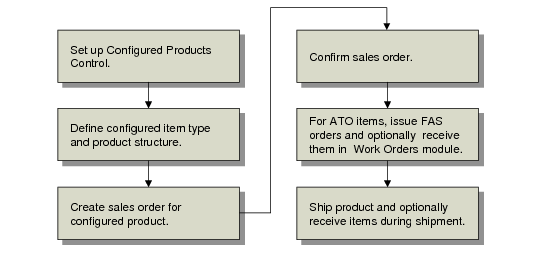
Configured Products Task Flow
Configured products are assembled from lower-level items that can be master scheduled and made to stock. They should not be confused with products such as specialized scientific instruments or communication satellites, which are engineered to order. Actual production of configured products is controlled, not by a master schedule, but by an assembly schedule driven by customer orders. The master schedule is then focused on a manageable number of lower-level items.
There are two types of configured products: assemble to order (ATO) and kits. The configuration type determines how the product is managed in the system. ATO items are managed in the Work Orders module with final assembly (FAS) work orders. Kits can be shipped and backflushed in one step.
Note: The system only supports kits in discrete sales orders—not customer scheduled orders.
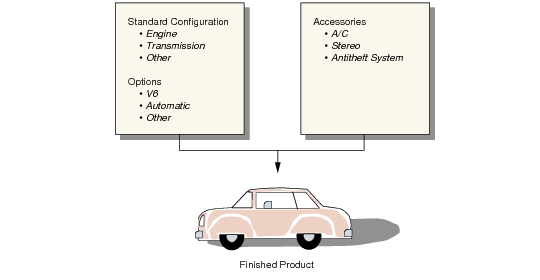
An option is a choice between two or more versions of a standard component. Using a car as an example, choice of engine size is an option. Nonstandard components such as stereos or antitheft systems are considered accessories. Options and accessories are organized into feature groups such as engine, transmission, or electronics.
Example Configured Product