Define Features and Options
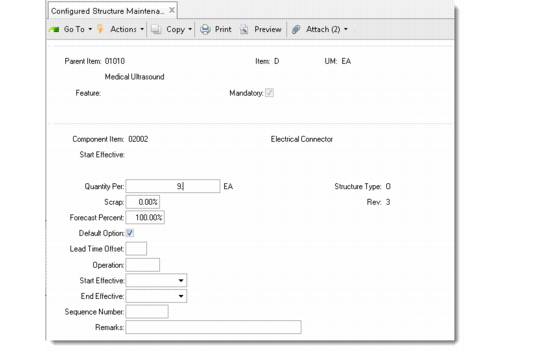
Define configured products using Configured Structure Maintenance (8.1). This program has two sections. In the first, you identify the configured product, set up a feature code, and indicate whether the feature is mandatory. In the second, you identify options available for this feature. The system automatically identifies a configured item with an O (option) structure type.
The Mandatory and Default Option settings can be used together to define a standard bill. The standard bill represents the typical way the product is sold. During order entry, selecting the standard bill bypasses the configured product pop-ups.
Configured Structure Maintenance (8.1)
Parent Item
Enter the number of the configured item. The value of Purchase/Manufacture for the item in Item Master Maintenance must be C (configured).
Feature
Enter a code identifying a set of options. Options are known as a feature set. For example, a car may have more than one engine option. You can set up a feature code called Engine, with the available engine choices being options of that feature code. During order entry, the system prompts you to select components from each feature set. This field corresponds to the Reference field in Product Structure Maintenance.
Mandatory
This field lets you define standard configurations. Enter Yes to indicate that a feature is required for a configured item. During order entry, the system displays a warning if a mandatory option is not selected.
Enter No to exclude an item from a standard configuration. Such items are typically accessories.
Component Item
Enter the item number for each option available for this feature.
Default Option
Yes indicates that this item is normally selected when this feature is included on a sales order. If Yes and Mandatory is Yes, the item is included in the standard bill. If Yes and Mandatory is No, it determines the default component of a nonstandard feature group selected during order entry.
Enter Yes to have the system select the component item for the standard bill of material. For example, in the case of a car, make the most popular engine model the default option.
Quantity Per
Enter the quantity of the component item normally used in the configured product. During order entry, the component quantity per is multiplied by the sales order quantity to determine the suggested quantity to select on the configuration. It can be changed manually.
The system creates a standard bill of material for items with Yes in both the Mandatory and Default Option fields. When you create a sales order for the configured product, you can use the standard bill of material or select individual components.