Setting Up Inventory Movement Codes for Legal Documents
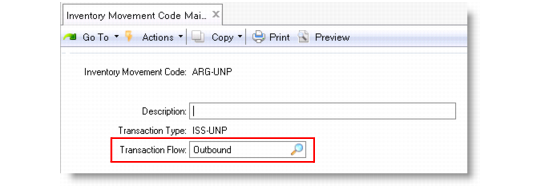
Each inventory movement code has a transaction flow attribute that indicates the logistical flow direction. This is key information for legal documents because it is one of the determinants of whether or not to generate a legal document in a transaction, and if so, the particular content, format, and layout of the printed legal document.
Use Inventory Movement Code Maintenance (1.1.9) to define inventory movement codes with appropriate transaction flow attributes required by legal documents.
For more information about defining inventory movement codes, see
Define Inventory Movement Codes.
Inventory Movement Code Maintenance (1.1.9)
Transaction Flow
Specify the direction of the inventory movement from a business perspective:
• Inbound: Inventory moves into the site/plant and may require receiving legal documents.
• Outbound: Inventory moves out of the site/plant and may require issuing legal documents.
• Internal: Inventory movements that do not require any legal documents.
Sometimes, a transaction that requires legal documents in one country does not have such requirements in another. For example, a work order receipt that reports production of finished goods is subject to legal documents in Poland, but this is not the case in Brazil and Argentina. Therefore, in Poland, the work order receipt should be defined as an inbound transaction, but it can be configured otherwise in Brazil and Argentina.
The transaction flow attribute can also be used to facilitate security setup. You can more easily distinguish receiving and issuing activities from internal transaction activities when implementing access control.
Important: Since all inventory transactions should be tracked with legal documents when you use the legal document functionality, ensure that you set Summarized Journal to No in Inventory Accounting Control. Otherwise, the system only records the legal document number for one of the summarized transactions.