Define Inventory Movement Codes
Movement codes are a common business practice in many countries and a legal requirement in others, such as Argentina. Inventory movement codes identify the reason for a transaction, as well as the type of transaction. Inventory movement codes enable you to create shippers for inventory issues not related to a sales order.
Use Inventory Movement Code Maintenance (1.1.9) to create these codes and their descriptions. Use Inventory Movement Code Browse (1.1.10) to search for and display information relative to existing inventory movement codes.
Inventory movement codes are similar to transaction types, but provide a more detailed reason for the transaction. There can be several inventory movement codes for each transaction type. The code can only be specified for the associated transaction. For example, you cannot assign an inventory movement code associated with receipts to a shipment transaction.
Example: One inventory movement code of type ISS‑SO may be required for sales order shipments to destinations within Italy, while another is required for shipments to destinations outside of Italy.
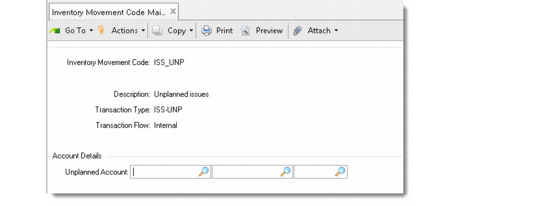
When you enter an inventory movement code with a transaction type of either RCT-UNP (unplanned receipts) or ISS-UNP (unplanned issues), you can also define the default GL account, sub-account, and cost center to use for processing unplanned issues or unplanned receipts. Defining defaults reduces errors by preventing shop floor workers from having to decide the accounting impact of inventory movements.
To edit shippers with assigned inventory movement codes and associated containers, use Container Workbench (7.7.1), Pre-Shipper/Shipper Workbench (7.9.2), or Sales Order Shipper Maintenance (7.9.8). If you attempt to edit such a container or shipper using SO Container Maintenance (7.7.5), the system displays an error message and indicates how you should proceed.
Note: An inventory movement code cannot be deleted if it is used by any shipment, site/inventory movement security record, or shipping group.
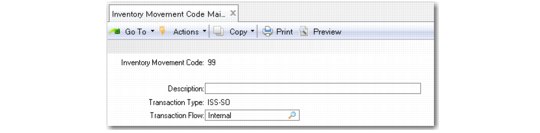
Inventory Movement Code Maintenance (1.1.9)
Specify the inventory movement code characteristics you want to create or modify by entering appropriate values in the following fields:
Inventory Movement Code
Enter a code of up to eight alphanumeric characters.
Description
Enter up to 30 characters describing this inventory movement code. Description displays on browses and reports.
Transaction Type
Enter a valid transaction type associated with this movement code. Transaction types can be up to eight alphanumeric characters. More than one movement code can reference the same transaction type. See
QAD Master Data User Guide for details on transaction types.
Transaction Flow
This field is specific to legal document implementation. Specify the direction of the inventory movement from a business perspective to determine if the transaction requires any legal documents, and if so, what type of legal documents.
For details on this field, see
Defining Legal Document Formats.
Specifying Default Accounts
This frame displays only when the transaction type is ISS-UNP or RCT‑UNP.
Inventory Movement Code Maintenance, Account Details
For unplanned receipts, enter the relevant GL credit account, sub-account, and cost center combination; for unplanned issues, enter the appropriate GL debit account, sub-account, and cost center combination. These accounts must be of type Standard.