Setup
Before using POD to track shipment status, ensure that you have configured the following settings properly:
• Container/Shipper Control
• Ship-To/POD Controls Maintenance
Container/Shipper Control
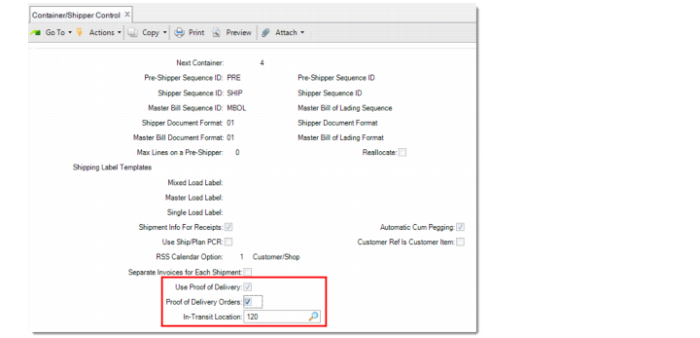
Use Container/Shipper Control to enable the POD functionality and define the default values of the POD requirement and in-transit location settings for new sales orders and new quotes. The settings apply to all customers. You can specify customer-specific values in Ship-To/POD Controls Maintenance. For details, see
Ship-To/POD Controls Maintenance.
Container/Shipper Control
Use Proof of Delivery
Enables or disables the Proof of Delivery functionality.
Yes: The Proof of Delivery functionality is enabled. All POD-associated fields and the POD Maintenance program are available.
No: The POD functionality is disabled. All POD-associated fields and the POD Maintenance program are unavailable.
Proof of Delivery Orders
Accessible only when the POD functionality is enabled. Specify the default value of the Proof of Delivery field on new sales quotes and new customer scheduled orders, and the POD field on new sales orders. The specific setting against ship-to addresses in Ship-To/POD Controls Maintenance takes precedence over this field.
In-Transit Location
This field is accessible and required only when the POD functionality is enabled. Specify the default in-transit location for the shipments of orders that require POD.
Important: Assign the in-transit location an inventory status code with Available and Nettable set to No. Otherwise, the items may be used for other orders, and MRP considers items in these locations as available to net against open requirements. This understates real demand. Do not use a Reserved Inventory location because it may prevent shipping from occurring.
• For non-consignment orders, the inventory is transferred from the stocking location to the in-transit location when the shipment is confirmed. When the corresponding POD is recorded in POD Maintenance, the inventory is issued from the in-transit location.
• For consignment orders, if an in-transit location is specified in the order line, the inventory is transferred to the consignment in-transit location when the shipment is confirmed. If no in-transit location is specified in the order line, the inventory is transferred to the in-transit location specified in Ship-To/POD Controls Maintenance, if available. Otherwise, the inventory is transferred to the in-transit location specified in Container/Shipper Control. When the corresponding POD is recorded in POD Maintenance, the inventory is transferred from the in-transit location to the consignment location.
Ship-To/POD Controls Maintenance
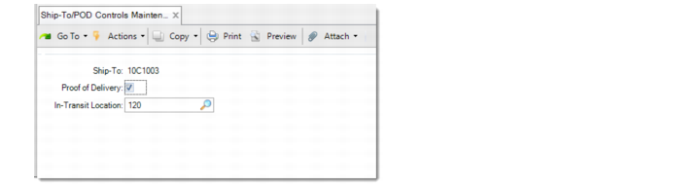
Use Ship-To/POD Controls Maintenance to define the default values of the Proof of Delivery (POD) fields and in-transit locations for specific ship-to addresses.
The values entered take precedence over the settings in Container/Shipper Control.
Ship-To/POD Controls Maintenance
When a new record is created, the following fields default from the corresponding fields in Container/Shipper Control.
Proof of Delivery Orders
Specifies the default value for the Proof of Delivery field on the header of new sales quotes and new customer scheduled orders, and the POD field on new sales orders that are shipped to the specified address. The value here overrides the corresponding field in Container/Shipper Control.
In-Transit Location
Specifies the location into which non-consignment shipments requiring POD are transferred when a shipment is confirmed. When Use Proof Of Delivery is selected, a value is required in the In-Transit Location field. The value here overrides the corresponding field in Container/Shipper Control.